13 Best Audio Interfaces of 2026 (Home Studio, Podcasting, iPad & 8-Channel)
Berklee-trained engineer Julian Reyes reviews the 13 best audio interfaces of 2026, matched by use: home studio, beginners, podcasting, vocals, iPad and 8-channel.
Updated
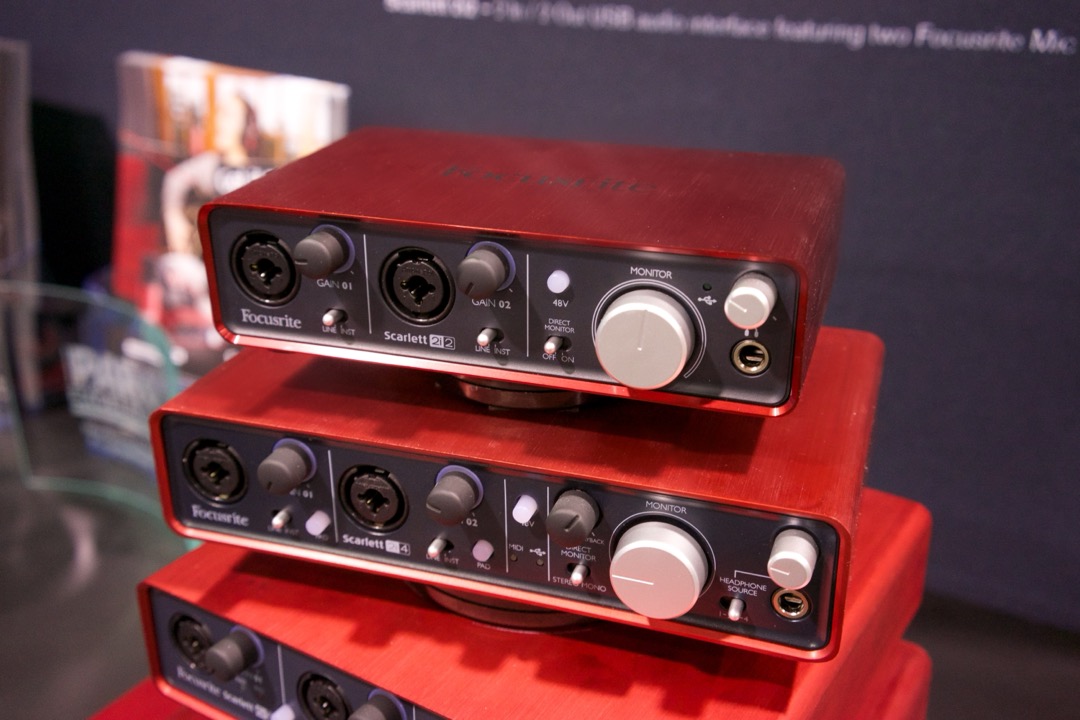
An audio interface is the least glamorous purchase in a home studio and the one that quietly decides whether anything else works. It is the box that takes the analogue signal from a microphone or a guitar, amplifies it, converts it to digital, and hands it to your computer in time for you to hear yourself while you play. Get it right and you stop thinking about it. Get it wrong and you spend a year blaming your microphone for a noise floor the interface is producing.
I spent several years buying gear for other people before I spent any of it on myself, and the pattern on the shop floor was remarkably consistent. Almost nobody arrived asking the question that mattered. They asked which brand, or which converter, or whether 192kHz was worth it. What actually determined whether they were happy six months later was much duller: how many microphone preamps the box really had, whether the drivers behaved on their particular computer, and whether it could supply enough clean gain for the microphone they had already bought.
So this roundup is organised the way I used to work through it at the counter. I looked at 13 interfaces for 2026, from a pocket-sized entry unit to an eight-preamp box that will take a full drum kit, and matched each one to a specific way of recording rather than ranking them on a single line. If you are buying a microphone at the same time, our best podcast microphones guide covers the other half of that decision.
Find the Best Audio Interface for Your Need
Jump straight to the section that matches what you are recording:
- Best audio interfaces overall
- Best audio interface for a home studio
- Best audio interface for beginners
- Best audio interface for podcasting
- Best audio interface for recording vocals
- Best audio interface for streaming and Twitch
- Best audio interface for iPad and iPhone
- Best 8-channel audio interface for bands and drum kits
- More audio interface picks by use case
How I Tested and Evaluated These Audio Interfaces
I want to be precise about what this is and is not. I have not run these thirteen units through a bench with an audio analyser, and any page telling you it measured round-trip latency on all of them to a tenth of a millisecond is asking you to take a great deal on trust. What I have is a decade of buying-desk experience with most of these product lines, time behind several of them in real sessions, and a systematic read of what owners report once an interface has been in daily use for a year. That combination catches the things that matter and it is honest about its limits.
Four criteria did most of the sorting. Driver stability came first, assessed separately for macOS and Windows, because it is the difference between an interface you forget about and one you reinstall. Class-compliant units that need no driver on macOS behave differently from units leaning on a manufacturer ASIO driver on Windows, and the same box can be excellent on one platform and irritating on the other. Second was latency behaviour at matched buffer sizes: not an absolute figure, but whether an interface holds a low buffer without crackling, which is what actually decides whether you can sing to a plugin chain.
Third was preamp gain and headroom, checked against the specific case that trips people up, which is a low-output broadcast dynamic microphone. An interface that runs out of clean gain at 50dB will make a Shure SM7B sound thin and hissy no matter how good its converters are. Fourth was the bundled software, judged on whether it changes a real buying decision rather than dismissed as marketing. For someone who already owns a DAW it is worth nothing. For a first-time buyer it is worth a great deal, and pretending otherwise is a failure to answer the question they came with. Every ASIN here was verified live on Amazon before publication, and listings with thin or suspicious review histories were left out.
Best Audio Interfaces Overall
These thirteen interfaces cover everything from a first microphone to a full band. Below, each is reviewed once in detail. Farther down, use-case sections pull two or three together so you can compare and decide quickly for the way you actually record.
Best Overall: Focusrite Scarlett 2i2 4th Gen
The 2i2 is the default recommendation in this category and it deserves the position, though not for the reason most people assume. It is not the best-sounding preamp here. That is the Audient. It is not the most capable box here either. What it is, more reliably than anything else in the field, is the interface that does not become a problem: it installs cleanly on macOS and Windows, it holds a low buffer, it survives operating system updates, and its behaviour is documented publicly by an enormous number of owners.
On top of that foundation sit the two features that matter most to the people actually buying a first interface. Auto Gain sets your level in about ten seconds by listening to you speak or play, which quietly eliminates the most common reason a first recording is unusable. Clip Safe watches the input thousands of times a second and pulls the gain back before a peak distorts, so the loudest moment of a take does not destroy the whole pass. Neither is a gimmick. Both address failures I watched people bring back to the counter for years.
Air mode is the third piece, and it is more than a treble boost. It has two settings, a presence lift and a harmonic drive derived from Focusrite’s ISA console preamps, and on a dull dynamic microphone the difference is real. The honest caveats are that there is one headphone output, so a second person in the room has nowhere to listen, and that the instrument input is a plain Hi-Z toggle rather than the variable impedance circuit a guitarist would prefer.

Focusrite Scarlett 2i2 4th Gen USB-C Audio Interface
by Focusrite
The interface I would put in front of nine out of ten people buying their first one: two clean preamps, the two features that stop beginners ruining takes, and drivers that behave on both platforms.
Pros
- Auto Gain sets your recording level for you in about ten seconds, which removes the single most common reason a first recording comes back unusable: a level staged by guesswork rather than by ear
- Clip Safe watches the input thousands of times a second and pulls the gain back before a peak distorts, so the one chorus you sang harder than the rest does not cost you the whole take
- Air mode is two distinct circuits, a presence lift and a harmonic drive derived from Focusrite's ISA console preamps, and on a dull dynamic microphone it is the difference between a flat take and a finished one
- It has 120dB of dynamic range and, more importantly, the cleanest driver record in the category: it installs without argument on macOS and Windows, survives OS updates, and comes with Pro Tools Intro, Ableton Live Lite and Cubase LE so there is a professional DAW on the machine the same evening
Cons
- The instrument input is a simple Inst toggle rather than a variable impedance circuit, so a guitar plugged straight in is served rather than flattered, and the AXE I/O One does that specific job better
- There is one headphone output, which quietly rules it out for tracking with a second person who needs their own mix
- The Volt 2 undercuts it while answering most of the same brief, so the difference buys Auto Gain, Clip Safe and the driver record rather than more inputs
Best Budget: M-Audio M-Track Solo
The M-Track Solo is the cheapest way to get a real microphone into a computer, and its 7,710 owner ratings make it the most thoroughly documented product on this page by a very large margin. On budget gear that history is worth more than any specification, because it means every quirk and every failure mode has already been described in public by someone who hit it first.
What you get is genuinely useful: one XLR preamp, a line and instrument input, and a hardware switch that flips your headphones between the computer’s output and the input itself, so you hear yourself with no delay while tracking. MPC Beats comes in the box, which is a better fit for someone making beats than the linear DAWs bundled elsewhere. It is small enough to live in a laptop bag rather than on a desk.
The ceiling is where the honesty is required. It records at 16-bit and 48kHz, which is a real limit rather than a marketing one: less headroom when you edit, and no route to high-resolution work later. There is one microphone preamp, so a second person is never an option. And the plastic build feels exactly like the entry tier. None of that stops it being a completely sufficient interface for someone recording one source at a time.

M-Audio M-Track Solo USB Audio Interface
by M-Audio
The cheapest honest way into recording, and a completely sufficient one if you track a single source at a time and can live with a 48kHz ceiling.
Pros
- With 7,710 owner ratings it has by a wide margin the largest evidence base on this page, and on a budget product that history is worth more than any specification, because every failure mode is already documented in public
- The USB and Direct monitoring switch is real hardware, so while tracking you hear yourself instantly rather than through a buffer that arrives late enough to put you off your timing
- It is genuinely pocket-sized and bus powered, so it lives in a laptop bag instead of taking up desk space
- MPC Beats is included, which is a more useful starting point for someone making beats than the linear DAWs bundled with the Focusrite units
Cons
- It tops out at 16-bit and 48kHz, so high-resolution recording is off the table entirely and there is less headroom for editing than anything else here
- There is one microphone preamp, so a second voice or a stereo pair is never an option no matter how the setup grows
- The chassis and knobs are plastic and feel exactly like what the entry tier buys
Best Upgrade: Universal Audio Apollo Solo Heritage Edition
The Apollo Solo is the most expensive interface on this page and the only one that changes how you record rather than what you record with. Its Unison preamps do something no plugin can: they alter the interface’s actual input impedance and gain staging to match the circuit being modelled, so selecting a Neve, an API, an Avalon or a Manley changes how the microphone loads rather than layering an EQ curve on top of an unchanged signal. Whether you hear that immediately depends on the source, but on a vocal through a good condenser it is not subtle.
The other half of the argument is DSP. UAD processing runs on the interface’s own chip, which means you monitor and print through a modelled preamp and compressor with latency low enough to sing to comfortably. Native plugins cannot reproduce that at a workable buffer. The Heritage Edition bundle puts a large set of those plugins in the box, and the headphone amplifier is the best here by a clear margin, which matters once a session runs past an hour.
The caveats are equally clear. LUNA, the free DAW that makes the software story so attractive, is macOS only, so a Windows buyer gets the hardware and none of it. The UAD ecosystem carries an ongoing cost, and the plugins you will want next are rarely the ones included. Most importantly, none of this pays off unless you actually track through processing. If you record flat and mix afterwards, a much cheaper interface will hand you an almost identical file.

Universal Audio Apollo Solo Heritage Edition
by Universal Audio
The most expensive interface here and the only one that changes how you record rather than just what you record with, provided the UAD way of working is one you actually want.
Pros
- Unison preamps change the interface's actual input impedance and gain staging to match the circuit being modelled, so a Neve, an API, an Avalon or a Manley behaves like the hardware instead of sitting on top of the signal like an EQ preset
- UAD processing runs on the interface's own DSP, so you monitor and print through the modelled preamp and compressor with latency low enough to sing to, which no native plugin chain reproduces
- The Heritage Edition ships with a large plugin bundle in the box, and those plugins are most of what separates this from a cheaper interface with similar converters
- The headphone amplifier is the best on this page and it is not close, which matters more than people expect once a vocal session runs past an hour
Cons
- The free LUNA DAW is macOS only, so a Windows buyer gets the hardware and none of the software story
- The UAD ecosystem carries a real ongoing cost, and the plugins you will want next are not the ones included
- None of it pays off unless you genuinely track through processing, and if you record flat and mix afterwards a cheaper interface hands you an almost identical file
Best for Tube Character: Universal Audio Volt 2
The Volt 2 is the most interesting alternative to the 2i2, and it wins on two things while losing on two others. Vintage Mode is a genuine emulation of Universal Audio’s 610 tube preamp circuit rather than a filter curve, and on a thin voice or a bright acoustic guitar it adds the thickening people otherwise chase with plugins after the fact. LUNA, given away with the hardware, is a full professional DAW rather than a limited edition of one.
It also undercuts the 2i2 while matching it on channel count, resolution and bus power, and it has MIDI in and out on the back, which the 2i2 does not. For a producer who wants character at the input stage rather than safety features, it is arguably the better buy.
What it loses is the ecosystem and one important compatibility detail. Focusrite’s accessory range, tutorial coverage and community troubleshooting are far larger, which matters more than it should when something behaves strangely at eleven at night. And using the Volt 2 with an iPad or iPhone requires external power plus an adapter that is not in the box, which the marketing does not make obvious. If you are on Windows, LUNA is unavailable and the software advantage largely disappears.

Universal Audio Volt 2 USB Audio Interface
by Universal Audio
The interface to buy if the 2i2's feature list interests you less than the sound of a tube preamp emulation and a professional DAW thrown in.
Pros
- Vintage Mode is a genuine emulation of UA's 610 tube preamp circuit rather than an EQ curve, and on a thin voice or a bright acoustic guitar it adds the thickening people normally chase with plugins afterwards
- LUNA is a full professional DAW given away with the hardware, which makes the software story here stronger than anything else at this tier
- It undercuts the Scarlett 2i2 while matching it on channel count, resolution and bus power, so the money saved costs you no capability
- MIDI in and out sit on the back panel, so a synth or a drum machine joins the setup without buying a second box
Cons
- Using it with an iPad or iPhone needs external power plus an adapter that is not in the box, which the marketing does not make obvious
- Universal Audio's accessory and tutorial ecosystem is far smaller than Focusrite's, so there are fewer public answers when something behaves oddly
- LUNA is Mac only, so on Windows the bundled software advantage largely evaporates
Best Single-Input Preamp: Audient iD4 MKII
If you only ever record one thing at a time, the iD4 MKII is the best-sounding way to do it here. Its preamp is derived from Audient’s ASP8024 recording console, and it carries around 58dB of clean Class-A gain, which is the figure that matters if you own a Shure SM7B or another low-output broadcast dynamic. That combination puts a demanding microphone at a healthy level without the hiss most entry interfaces add in the last few decibels of the dial.
The hardware around it is unusually thoughtful. The big scroll wheel sets monitor level and, pushed into its second function, sets the balance between your live input and the playback, which means the two adjustments you make constantly while tracking are both under one finger rather than in a driver control panel. There are two independent headphone outputs, which is remarkable on a single-input interface and turns it into a genuine two-person tracking tool even though only one of you can be miked. The discrete JFET instrument input is also audibly better on a passive guitar than a generic Hi-Z jack.
The limits are structural rather than fixable. One microphone input means no stereo pair and no co-host, permanently. It stops at 96kHz where most of the field reaches 192kHz, which almost nobody needs but is a real gap on paper. And stock has been intermittent, so check availability before you plan around it.

Audient iD4 MKII USB-C Audio Interface
by Audient
One input, but the best-sounding one on this page, with the gain to drive an SM7B and hardware monitor control nothing else at this tier offers.
Pros
- The scroll wheel is assignable hardware: it sets monitor level, and pushed into its second function it sets the balance between your input and the playback, which nothing else here does without opening software
- Two independent headphone outputs mean a second person in the room gets their own mix, which is not a feature you normally find on a single-input interface
- The preamp is derived from Audient's ASP8024 console and carries around 58dB of clean Class-A gain, enough to drive a Shure SM7B or another low-output dynamic without the hiss entry interfaces add at the top of the dial
- The instrument input is a discrete JFET circuit rather than a generic op-amp buffer, and it is audibly better on a passive guitar than a plain Hi-Z jack
Cons
- There is one microphone input, so two-person tracking and stereo pairs are permanently out
- It stops at 96kHz where most of the field reaches 192kHz, which almost nobody needs but is a real specification gap
- Stock has been intermittent, so check availability before you build a plan around it
Best Two-Preamp Entry Interface: PreSonus AudioBox 96 25th Anniversary
The AudioBox 96 does something the entry tier rarely manages: it puts two full Class-A microphone preamps in a box most people expect to hold one. That is the difference between recording a singer and a guitar in one pass and recording them separately, and between interviewing someone properly and passing a microphone back and forth. It has MIDI in and out as well, which quietly makes it a better hub for a small synth setup than several interfaces sitting above it.
The bundle is genuinely strong. Studio One Artist is a complete production environment rather than a demo, and Ableton Live Lite alongside it means you can try two very different workflows before committing to either. The mixer knob blends input against playback in hardware, so zero-latency monitoring never involves opening a control panel.
The compromises are the ones the tier demands. It connects over USB-B on USB 2.0, so you are carrying an older cable standard and a bulkier connector. The converters and preamps are basic next to the 4th-gen Scarletts, and on a quiet source you will hear that in the noise floor. The chassis is functional rather than reassuring. For someone whose main constraint is needing two microphone inputs without moving up a tier, it remains the obvious answer.

PreSonus AudioBox 96 25th Anniversary USB Audio Interface
by PreSonus
Two real microphone preamps and MIDI at the entry tier, which is a specification combination almost nothing else at this level offers.
Pros
- Two full Class-A microphone preamps at the entry tier is genuinely uncommon, and it is the difference between recording an interview or a singer and a guitar properly and recording them in two separate passes
- Studio One Artist plus Ableton Live Lite is a serious pair of DAWs to find in a box at this level, and Studio One Artist is a complete production environment rather than a feature-limited demo
- The mixer knob blends input against playback in hardware, so zero-latency monitoring never involves a driver control panel
- MIDI in and out are included, which quietly makes it a better hub for a small synth setup than several interfaces above it
Cons
- It connects over USB-B on USB 2.0, so you are carrying an older cable standard and a bulkier connector than the USB-C field
- The converters and preamps are basic next to the 4th-gen Scarletts, and on a quiet source you will hear the difference in the noise floor
- The build is functional rather than reassuring, with a lighter chassis than the Audient or Focusrite units
Best for Podcasting and Loopback: MAONO P2 Hybrid
Most audio interfaces treat the computer as a destination. The P2 Hybrid treats it as a source too, and that single design choice is why it belongs on a podcasting shortlist. Its built-in loopback captures desktop and call audio alongside the microphones, so a remote guest on a video call and the two people in your room land in one recording without routing software, a virtual cable or a second computer.
Around that sit two XLR inputs with 56dB of gain each, so a co-host plugs in rather than waiting for you to buy a second interface, and per-channel mute buttons on the front panel that make cutting a cough a physical action instead of a mouse click. Its dual ports let it connect to a phone and a computer at the same time, which is genuinely useful if you stream from one device and record on the other.
The trade is evidence and dependence. Full routing control lives in MAONO’s ProStudio 2 software, so the features you buy it for require an application running in the background. With 103 ratings it has a thin owner history for a device whose headline feature depends on software, and its 4.2 rating is the joint lowest on this page, with critical reviews clustering on software behaviour rather than hardware. If loopback is the reason you are buying, it does that job better than anything else here. If it is not, buy something with a longer record.

MAONO P2 Hybrid USB Audio Interface
by MAONO
The interface built for the job most audio interfaces do badly: getting a remote guest, two microphones and your desktop audio into one clean recording without a workaround.
Pros
- Built-in loopback captures your desktop and call audio alongside the microphones, which is the entire job when a guest is on a video call and both sides have to land in one recording
- Two XLR inputs with 56dB of gain each mean a co-host sits down and plugs in rather than waiting for you to buy a second interface
- It connects to a phone and a computer at the same time through its dual ports, which is genuinely useful when you stream from one device and record on the other
- Per-channel mute is on the front panel, so cutting a cough mid-episode is a button rather than a mouse click in software
Cons
- Full routing control lives in MAONO's ProStudio 2 software, so the features you buy it for depend on a companion application running in the background
- This is the newest product from the newest brand here, and 103 ratings is a thin owner history for a device whose headline feature depends on software that will keep changing
- Its 4.2 rating is the joint lowest on this page, and the recurring theme in the critical reviews is software behaviour rather than hardware
Best for iPhone and iPad: Shure MVX2U Gen 2
The MVX2U is not really an audio interface. It is an exceptionally good microphone preamp on the end of an XLR cable with a USB-C plug at the other end, and understanding that is the key to buying it correctly. What it does is turn a dynamic microphone you already own into a mobile recording rig, and it does that more reliably than anything else on this page because it is MFi certified. Apple has tested it. On iOS, where compatibility claims are usually hopeful, that certification is the difference between a plan and a gamble.
The onboard processing is Shure’s, which shows. Auto-level holds you steady when you lean in and pull back, and voice isolation pushes room noise down under your voice, both running on the device before the signal reaches your phone. The gain structure is broadcast-grade and drives a demanding dynamic microphone without the thin, hissy result that cheap XLR-to-USB adapters produce.
Its limits follow directly from what it is. One input, so a co-host needs a second unit and there is no shared monitoring. No line input, no MIDI and no outputs to speakers, because it is a bridge rather than an interface. And no instrument input at all, which rules it out entirely for anyone recording guitar or bass directly.

Shure MVX2U Gen 2 XLR-to-USB-C Audio Interface
by Shure
Not really an interface so much as a very good preamp on the end of a cable, and the most dependable way to get one XLR microphone into an iPhone or iPad.
Pros
- It is MFi certified, which means Apple has actually tested it, so iPhone and iPad compatibility is a guarantee here rather than a hope, and that is rare in this category
- Auto-level and voice isolation run on the device itself, so the microphone arrives at your recorder already sounding finished
- It is small enough to live permanently on the end of an XLR cable in a bag, which turns any dynamic microphone you already own into a mobile rig
- Shure's broadcast pedigree shows in the gain structure: it drives a demanding dynamic microphone without the thin, hissy result cheap XLR-to-USB adapters produce
Cons
- One input, so a co-host needs a second unit and there is no shared monitoring between them
- It is an XLR-to-USB bridge rather than a full interface, so there is no line input, no MIDI and no outputs to speakers
- There is no instrument input at all, which rules it out for anyone recording guitar or bass directly
Best for Guitar and Reamping: IK Multimedia AXE I/O One
Almost every interface here was designed by people thinking about microphones. The AXE I/O One was designed by people thinking about pickups, and if you record guitar directly it is a meaningfully different tool. Its Z-TONE circuit varies input impedance continuously, so a vintage single-coil and a hot active humbucker each see the load they were built for instead of one compromise value, and an active and passive selector sits alongside it. The effect is not subtle on a passive guitar: the top end opens up and the pickup sounds like itself rather than merely present.
The dedicated amp output is the other reason it exists. It sends a recorded dry track back out to a real amplifier so you can re-record the amp later, which is a proper studio technique and one no other interface here supports. Combined with the included AmpliTube 5 SE and TONEX SE, it covers both approaches: model the amp in software now, or commit to a real one later. If you are building the rest of that chain, our best multi-effects pedals and best guitar amps guides cover what sits either side of it.
The limits are worth stating plainly. There is one combo input, so it is a solo tracking interface and nothing more. Everything distinctive about it is guitar-specific, so a podcaster is paying for circuitry that will never be engaged. And with 262 ratings the evidence base is thin next to the Focusrite and M-Audio units, though nothing in it is alarming.

IK Multimedia AXE I/O One USB Audio Interface
by IK Multimedia
The one interface here designed by people thinking about pickups rather than microphones, and the only one that will send a finished take back out to a real amplifier.
Pros
- The Z-TONE circuit varies input impedance continuously, so a vintage single-coil and a hot active humbucker each see the load they were designed for instead of one compromise value
- An active and passive selector sits alongside it, which is the difference between a pickup sounding right and sounding merely present
- The dedicated amp output sends a recorded dry track back out to a real amplifier for reamping, and it is the only interface here that supports that technique
- AmpliTube 5 SE and TONEX SE are included, so the amp modelling half of a guitar recording rig is solved in the box
Cons
- One combo input, so it is a solo tracking interface and nothing more
- Everything distinctive about it is guitar-specific, and if you are recording voices you are paying for circuitry you will never engage
- With 262 ratings the evidence base is thin next to the Focusrite and M-Audio units, though nothing in it is alarming
Best for Field Recording: IK Multimedia iRig Pro Duo I/O
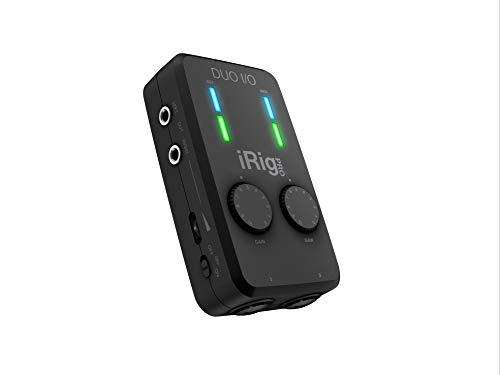
Every interface manufacturer claims iPad compatibility. The iRig Pro Duo I/O is one of the very few that makes it true in the box, by shipping USB-C, Lightning and USB-A cables together rather than assuming you own the right one. That sounds like a small thing until you have stood somewhere with a subject waiting and the wrong cable in your bag.
The second reason it is here is power. It runs on two AA batteries, so a location recording depends on neither the host device’s battery nor a socket, and that makes it the only genuinely untethered option on this page. Two XLR combo inputs with Class-A preamps mean it is a real two-source interface, not a phone dongle with a microphone jack, and MIDI in and out let a controller keyboard travel with it.
What you give up is autonomy and, to a degree, confidence. There is no screen and no standalone recording, so it depends entirely on the phone, tablet or laptop it is attached to. Battery life is the complaint that recurs most in owner reviews on long sessions, so carry spares. At 4.2 it shares the lowest rating here, and the critical reviews cluster on connection reliability across device generations rather than on sound.
IK Multimedia iRig Pro Duo I/O USB Audio Interface
by IK Multimedia
The interface that actually ships the cables its marketing implies, and the only one here that will run on AA batteries somewhere with no power.
Pros
- USB-C, Lightning and USB-A cables are all in the box, which is the single thing that makes the claim of iPad compatibility true on arrival rather than after a second order
- It runs on two AA batteries, so field recording depends on neither the host device's battery nor a power outlet
- Two XLR combo inputs with Class-A preamps make it a genuine two-source interface rather than a phone dongle with a microphone jack
- MIDI in and out are included, so a controller keyboard travels with it as easily as a microphone does
Cons
- There is no screen and no standalone recording, so it depends entirely on the phone, tablet or laptop it is plugged into
- Battery life is the complaint that recurs most in owner reviews on long sessions, so carry spares
- At 4.2 it shares the lowest rating on this page, and the critical reviews cluster on connection reliability across device generations
Best 4-Channel Interface: Focusrite Scarlett 4i4 4th Gen
At 4.7 stars the 4i4 is the highest-rated product in this roundup, and reading its reviews is instructive: they overwhelmingly come from people who knew exactly what they needed and got it. It is the 2i2 with room to grow, carrying identical Auto Gain, Clip Safe and Air circuitry alongside double the inputs and outputs, MIDI in and out, and four line outputs for a second pair of monitors or an outboard chain. It manages all of that while remaining bus powered, which is unusual once an interface passes two channels.
The natural buyer is someone whose room contains hardware. A synth, a drum machine or an electronic kit wired in permanently alongside a microphone stops being a repatching exercise every session, and the MIDI ports mean the same box handles note data. If that describes your setup, our best electronic drum sets roundup covers what tends to arrive next.
The one thing to be clear about before ordering is what four inputs means. Two of them are microphone preamps and the other two are line level, and buyers who read four-in as four microphones are the source of most of its disappointed reviews. It is also a real step up in outlay from the 2i2 for capability plenty of home studios never use, and it takes up noticeably more desk space.

Focusrite Scarlett 4i4 4th Gen USB-C Audio Interface
by Focusrite
The 2i2 with room to grow: the same preamps and the same safety features, plus the MIDI and line I/O a setup with hardware instruments actually needs.
Pros
- At 4.7 stars it is the highest-rated product in this roundup, and the reviews read like people who bought exactly the right thing for what they were doing
- It carries the same Auto Gain, Clip Safe and Air circuitry as the 2i2 with double the inputs and outputs, so nothing is traded away for the extra channels
- MIDI in and out plus four line outputs make it the natural hub for a room with a synth, a drum machine and a second pair of monitors
- It is still bus powered despite the extra I/O, which is unusual once an interface passes two channels
Cons
- Only two of the four inputs are microphone preamps and the other two are line level, and buyers who read four inputs as four microphones are the source of most of its disappointed reviews
- It is a meaningful step up in outlay from the 2i2 for capability that plenty of home studios never use
- It is physically larger and wants real desk space next to a laptop
Best 8-Channel Interface: Behringer U-PHORIA UMC1820
The UMC1820 exists for one reason and executes it well: eight Midas-designed microphone preamps for what most brands charge for two. Nothing else in the category does that at this level, and it is the difference between recording a drum kit properly and recording it with two overheads and hope. Phantom power is available on all eight channels, so condenser overheads and room microphones sit alongside close microphones in the same session, and ADAT expansion takes the unit to eighteen inputs if a band outgrows eight.
It has been doing this job long enough that the ecosystem around it is mature. Setup guides, session templates and troubleshooting threads for tracking full kits on this specific interface are everywhere, which matters when you are patching eight channels for the first time and something is silent.
The compromises are the ones the price implies. It needs an external power supply, so it is a studio unit and not a mobile one. USB-B on USB 2.0 is dated, and eight channels at 96kHz consumes a real share of that bandwidth. Most importantly, this is the one interface here where the platform question genuinely changes the recommendation: the Windows driver is well established, and macOS reports are noticeably more mixed. On a Mac, go in expecting to do some reading.

Behringer U-PHORIA UMC1820 USB Audio/MIDI Interface
by Behringer
Eight real preamps and ADAT expansion at an outlay that makes recording a live band plausible in a room that is not a commercial studio.
Pros
- Eight Midas-designed microphone preamps for what most brands charge for two is the reason this interface exists, and there is nothing else in the category doing it at this level
- 48V phantom power is available across all eight channels, so condenser overheads and room microphones sit alongside the close microphones on the same session
- ADAT expansion takes it to eighteen inputs, so a band that outgrows eight channels adds a preamp box instead of replacing the interface
- It has been recording full drum kits for long enough that the setup guides, templates and troubleshooting threads for it are everywhere
Cons
- It needs an external power supply, so it is a studio unit rather than a mobile one
- USB-B on USB 2.0 is dated, and eight channels at 96kHz uses a real share of that bandwidth
- Mac driver reports are noticeably more mixed than Windows ones, and this is the one interface here where the platform question genuinely changes the recommendation
Best Complete Beginner Bundle: Focusrite Scarlett Solo Studio 4th Gen
The Solo Studio answers a question nobody at the counter ever asked directly but everybody meant: what do I need to buy so that I can record something tonight. Interface, condenser microphone and closed-back headphones arrive in one box, and there is genuinely nothing left to purchase. That completeness has real value for someone who has never bought studio gear and does not yet know which corners are safe to cut.
What makes it more than a starter kit is that the components are not throwaways. The CM25 MkIII is a real large-diaphragm condenser you will still be using in two years, and the SH-450 headphones are closed-back, which is the correct type for tracking and precisely the thing beginners most often get wrong when choosing alone. The interface carries the same 4th-gen preamp, Air mode and software stack as the 2i2, so it is not a cut-down version.
Two things to weigh. The interface is the Solo, so there is one microphone input and no route to recording two people later, which makes it the wrong purchase for anyone with a co-host in mind. And it is priced close to buying a 2i2 and a microphone separately, so the value depends on wanting this exact pairing rather than choosing your own. If you do want it, the bundle removes an evening of research.

Focusrite Scarlett Solo Studio 4th Gen Bundle
by Focusrite
The whole first recording setup in one box, with a condenser microphone good enough that you will not immediately want to replace it.
Pros
- Interface, condenser microphone and closed-back headphones arrive together, so there is genuinely nothing left to buy before the first recording
- The CM25 MkIII is a real large-diaphragm condenser rather than the throwaway microphone bundles usually include, and it will still be worth using in two years
- It carries the same 4th-gen preamp, Air mode and software stack as the 2i2, so the interface half of the bundle is not a cut-down version
- The SH-450 headphones are closed-back, which is the correct type for tracking and the thing beginners most often buy wrong on their own
Cons
- The interface is the Solo, so there is one microphone input and no route to recording two people later
- It is priced close to buying the 2i2 and a microphone separately, so the value depends on wanting this exact pairing rather than choosing your own
- A condenser microphone in an untreated room hears the room, and the bundle does nothing to solve that
Best Audio Interface for a Home Studio
The home studio case is the broadest one on this page, and the right answer depends almost entirely on whether your room contains hardware. If it is you, a microphone and a guitar, two channels is plenty and you should spend the difference on the room. If a synth or a drum machine is permanently wired in, four channels stops being a luxury and starts saving you a repatch every session.
All three of these have the resolution and the bus power to sit on a desk with a laptop and disappear. They differ on character and capacity: the first is the safe default with the best safety features, the second trades those features for a tube preamp emulation, and the third is the one to buy if the room is going to grow.
| Product | Price | Buy |
|---|---|---|
| Focusrite Scarlett 2i2 4th Gen USB-C Audio InterfaceBest home studio interface overall Auto Gain and Clip Safe remove the two most common recording mistakes, on the most dependable drivers in the category | $224.99 | View on Amazon |
| Universal Audio Volt 2 USB Audio InterfaceBest for character at the input stage A genuine 610 tube preamp emulation plus MIDI I/O and a full professional DAW, for producers who want colour rather than safety nets | $199.00 | View on Amazon |
| Focusrite Scarlett 4i4 4th Gen USB-C Audio InterfaceBest for a home studio with hardware Four inputs, four outputs and MIDI while staying bus powered, for a room with a synth or an electronic kit wired in | $299.99 | View on Amazon |
Best Audio Interface for Beginners
The best first interface is the one that produces a usable recording before you have learned anything, and then does not need replacing once you have. That rules out both extremes: a unit with no gain assistance leaves you guessing at levels, and a professional box with modelling DSP is capability you cannot yet use.
The real decision here is how much you are buying at once. If you own no microphone and no headphones, the bundle removes every remaining choice and the components are good enough to keep. If your budget is the binding constraint, the entry unit is genuinely sufficient rather than a compromise. And if you already own a microphone, the overall pick is the one you will not outgrow.
| Product | Price | Buy |
|---|---|---|
| Focusrite Scarlett Solo Studio 4th Gen BundleBest beginner bundle Interface, large-diaphragm condenser and closed-back headphones in one box, with nothing left to buy | $279.99 | View on Amazon |
| M-Audio M-Track Solo USB Audio InterfaceBest beginner interface on the smallest budget One preamp, hardware direct monitoring and MPC Beats included, at the lowest outlay on this page | $49.00 | View on Amazon |
| Focusrite Scarlett 2i2 4th Gen USB-C Audio InterfaceBest beginner interface to grow into Auto Gain sets your level for you and Clip Safe stops a loud take distorting, so early mistakes stop costing takes | $224.99 | View on Amazon |
Best Audio Interface for Podcasting
Podcasting asks for things music recording does not. You need a channel per voice, you frequently need audio from a video call to land in the same recording, and you need to mute someone without touching a mouse. Resolution above 48kHz is irrelevant here, which frees up the decision considerably.
The split is straightforward. If a remote guest is part of your format, loopback is not a nice-to-have and only one of these has it built in. If your show is two people in one room and nothing else, a pair of clean preamps and a blend knob is all the hardware you need. And if you record alone with one microphone, a compact bridge with onboard processing is less to carry and less to configure.
| Product | Price | Buy |
|---|---|---|
| MAONO P2 Hybrid USB Audio InterfaceBest podcasting interface overall Loopback captures a remote guest and your desktop audio alongside two XLR microphones, with front-panel mute per channel | $99.99 | View on Amazon |
| Shure MVX2U Gen 2 XLR-to-USB-C Audio InterfaceBest for a solo podcaster Broadcast-grade gain and onboard auto-level in a unit small enough to live on the end of a microphone cable | $139.00 | View on Amazon |
| PreSonus AudioBox 96 25th Anniversary USB Audio InterfaceBest two-microphone podcasting interface Two Class-A preamps and a hardware monitor blend, for two people in one room with no remote guest | $95.71 | View on Amazon |
Best Audio Interface for Recording Vocals
Vocals are where preamp quality stops being an abstraction. A voice sits exposed in a mix with nothing to hide behind, so noise floor, headroom and the character of the gain stage all end up audible in a way they rarely are on a guitar amp or a synth. This is also the use case where a second headphone output changes how a session runs, because a producer and a singer need to hear different things.
Which of these three is right depends on how you want to work. Track flat and shape it afterwards, and the cleanest preamp with the most gain wins. Track through processing and commit, and the modelling interface is a different tool entirely. Track alone with a condenser and no strong opinion yet, and the default pick is the sensible choice.
| Product | Price | Buy |
|---|---|---|
| Audient iD4 MKII USB-C Audio InterfaceBest vocal preamp for the money A console-derived Class-A preamp with around 58dB of clean gain, plus two headphone outputs for producer and singer | $196.10 | View on Amazon |
| Universal Audio Apollo Solo Heritage EditionBest for tracking through processing Unison preamp modelling and onboard DSP let you monitor and print through a compressor with latency low enough to sing to | $558.70 | View on Amazon |
| Focusrite Scarlett 2i2 4th Gen USB-C Audio InterfaceBest all-round vocal interface Clip Safe protects the loudest line of a take and Air adds presence to a dull microphone, on drivers that never argue | $224.99 | View on Amazon |
Best Audio Interface for Streaming and Twitch
Streaming has one requirement that recording does not: your voice, your game or desktop audio, and anyone on a call all have to be routed correctly in real time, and you have to be able to change that routing without leaving the stream. Latency matters more than resolution, and hardware controls matter more than either.
Loopback is the deciding feature and only one of these has it built into the hardware. The other two are here because plenty of streamers need something different: a box with enough inputs and outputs to run a separate monitor path and hardware alongside the microphone, or the simplest reliable single-microphone chain with a mute you can reach.
| Product | Price | Buy |
|---|---|---|
| MAONO P2 Hybrid USB Audio InterfaceBest streaming interface overall Hardware loopback plus dual-device connection, so game audio, a call and two microphones all land where you need them | $99.99 | View on Amazon |
| Focusrite Scarlett 4i4 4th Gen USB-C Audio InterfaceBest for a multi-source stream setup Four inputs and four outputs give a separate monitor path and room for hardware alongside the microphone | $299.99 | View on Amazon |
| Focusrite Scarlett 2i2 4th Gen USB-C Audio InterfaceBest simple streaming interface Two clean preamps, direct monitoring and drivers that hold a low buffer through a long stream | $224.99 | View on Amazon |
Best Audio Interface for iPad and iPhone
This is the category where marketing and reality diverge most, so read the specification carefully. An iPad supplies far less current over its port than a laptop does, which means a bus-powered interface that runs happily off a computer may need external power off a tablet. And an interface with a USB-C socket still needs the right cable, which is frequently not included, with an older Lightning iPhone needing an adapter on top.
Two of these three were built with that in mind, and it shows in what is in the box. The third is here as the desk option: if you are recording to a tablet at a table rather than on the move, a full USB-C interface with real preamps is a better tool than anything designed to be portable.
| Product | Price | Buy |
|---|---|---|
| IK Multimedia iRig Pro Duo I/O USB Audio InterfaceBest for iPad and iPhone overall USB-C, Lightning and USB-A cables all in the box, plus AA battery operation for recording with no computer nearby | $229.99 | View on Amazon |
| Shure MVX2U Gen 2 XLR-to-USB-C Audio InterfaceBest single-microphone iOS option MFi certified, so Apple compatibility is tested rather than claimed, with auto-level running on the device itself | $139.00 | View on Amazon |
| Focusrite Scarlett 2i2 4th Gen USB-C Audio InterfaceBest desk interface for tablet recording A full two-preamp interface over USB-C for recording to a tablet at a desk rather than in the field | $224.99 | View on Amazon |
Best 8-Channel Audio Interface for Bands and Drum Kits
Eight channels is a threshold rather than a preference. A standard drum kit wants a kick, a snare, two overheads and often two toms before you have miked anything else in the room, and a live band adds bass, guitar and a vocal on top. Below eight preamps you are recording in passes, which is fine for an arrangement and impossible for a performance.
Only one of these is a genuine eight-preamp interface, and the other two are here for the honest smaller cases. A four-channel box handles a stripped-back kit with a kick, a snare and a stereo overhead pair if you are willing to work within that. A two-preamp unit handles a well-placed overhead pair, which is a legitimate and often better-sounding way to record a kit in a small room.
| Product | Price | Buy |
|---|---|---|
| Behringer U-PHORIA UMC1820 USB Audio/MIDI InterfaceBest 8-channel interface overall Eight Midas-designed preamps with phantom power on every channel, expandable to eighteen inputs over ADAT | $229.00 | View on Amazon |
| Focusrite Scarlett 4i4 4th Gen USB-C Audio InterfaceBest 4-channel option for a small kit Two mic preamps and two line inputs for a kick, snare and stereo pair, still bus powered from a laptop | $299.99 | View on Amazon |
| PreSonus AudioBox 96 25th Anniversary USB Audio InterfaceBest two-microphone overhead setup Two Class-A preamps and MIDI, for recording a kit with a well-placed overhead pair in a small room | $95.71 | View on Amazon |
More Audio Interface Picks by Use Case
A few narrower needs come up often enough to deserve a direct answer, and each of these is the pick for one specific job rather than a general recommendation.
| Product | Price | Buy |
|---|---|---|
| Audient iD4 MKII USB-C Audio InterfaceBest for SM7B and low-output dynamic microphones Around 58dB of clean Class-A gain drives a Shure SM7B or an RE20 at a healthy level without the hiss entry interfaces add at the top of the dial | $196.10 | View on Amazon |
| IK Multimedia AXE I/O One USB Audio InterfaceBest for direct guitar recording and reamping Continuously variable input impedance for any pickup, plus an amp output that sends a recorded take back out to a real amplifier | $129.99 | View on Amazon |
| IK Multimedia iRig Pro Duo I/O USB Audio InterfaceBest for portable and field recording Runs on two AA batteries and ships USB-C, Lightning and USB-A cables, so it works with no computer and no power outlet | $229.99 | View on Amazon |
| PreSonus AudioBox 96 25th Anniversary USB Audio InterfaceBest two-microphone value at the entry tier Two Class-A preamps plus MIDI at the entry tier, the least expensive route here to two simultaneous microphone inputs | $95.71 | View on Amazon |
| M-Audio M-Track Solo USB Audio InterfaceCheapest way into recording The lowest outlay on this page, with hardware direct monitoring and MPC Beats included, if one input at 48kHz is enough | $49.00 | View on Amazon |
| Focusrite Scarlett 4i4 4th Gen USB-C Audio InterfaceBest 4-channel interface Two mic preamps, two line inputs, four outputs and MIDI, still bus powered from a single cable | $299.99 | View on Amazon |
Buyer's Guide
Almost every audio interface regret I have heard traces back to one of six things, and none of them is the converter chip everyone argues about online. Here is what actually separates these units once they are on a desk and being used.
Preamp count versus total input count
This is the specification most often misread, and it produces more disappointed reviews than anything else in the category. An interface advertised as four-in does not necessarily have four microphone preamps. The Scarlett 4i4 has two microphone preamps and two line inputs, which is exactly right for a microphone and a synth but useless if you wanted to record four singers. The UMC1820 genuinely has eight microphone preamps with phantom power on every one, which is what makes it a drum kit interface rather than a large stereo box. Before buying, count the sources that make sound at the same moment and check that number against the preamp count, not the input count. A line input takes a keyboard, a drum machine or a mixer output. Only a microphone preamp with phantom power takes a microphone.
Connection type and bus power
USB-C is the current standard and it matters less for speed than for what it lets you plug into. A USB-C interface connects to a modern laptop and often to a tablet with the right cable, where an older USB-B unit like the AudioBox 96 or the UMC1820 needs a bulkier cable and an adapter on a machine with no full-size ports. Bus power is the more practical question. A bus-powered interface takes everything it needs from the data cable, which means one cable to a laptop and a genuinely portable setup. The UMC1820 needs an external supply, which is fine for a studio and disqualifying for location work. And watch for the middle case: the Volt 2 is bus powered from a computer but needs external power from an iPad, which is the kind of detail that only surfaces after the box is open.
Driver stability on Mac versus Windows
This is the difference between an interface you forget about and one you fight, and it is unevenly distributed across the field. Focusrite has the strongest record on both platforms, which is a large part of why the Scarlett line is the default recommendation rather than the best specification. Audient and Universal Audio are class compliant on macOS and generally clean on Windows. PreSonus and M-Audio are dependable at the entry tier with occasional first-install friction. The clearest split on this page is the UMC1820, where the Windows driver is well established and the macOS reports are noticeably more mixed, which genuinely changes the recommendation depending on your machine. On macOS, prefer a class-compliant interface that needs no driver at all. On Windows, prefer a manufacturer with an active ASIO driver and a recent release history, because ASIO quality is what determines the buffer size you can work at.
Gain range and headroom for low-output microphones
Every guide mentions the Shure SM7B and almost none of them turn it into a buying rule, so here it is. Popular broadcast dynamics have very low output and want somewhere around 60dB of clean gain to sit at a healthy recording level. Plenty of entry interfaces provide less than that, or provide it while adding audible hiss in the last few decibels of the dial, and the result is a thin, hissy recording that people blame on the microphone. If you own or intend to buy an SM7B, a RE20 or a similar low-output dynamic, check the gain figure before you check anything else. The Audient iD4 MKII is the standout here with roughly 58dB of clean Class-A gain, and the MAONO P2 Hybrid quotes 56dB per channel. The alternative is an inline gain booster between the microphone and the interface, which works well and is an extra purchase nobody budgets for. Condensers and most modern USB-friendly dynamics do not have this problem.
Headphone outputs and monitor mixing
Two things separate a comfortable session from an awkward one, and neither appears in a specification comparison. The first is how many headphone outputs there are. Almost everything here has one, which is fine alone and immediately limiting the moment a second person is in the room. The Audient iD4 MKII has two independent outputs, which is remarkable on a single-input interface and the reason it works well for a producer sitting with a singer. The second is direct monitoring, which routes your input straight to your headphones in hardware so you hear yourself with no delay while the computer catches up. Every interface here does it, but the control varies enormously: the AudioBox 96 gives you a blend knob, the iD4 MKII puts blend on the scroll wheel, and the MAONO P2 Hybrid puts routing in software. Hardware control is faster to use and does not stop working when an application crashes.
Bundled software, and whether it actually matters
It matters exactly once, and it matters a great deal that one time. If you have never recorded anything, a bundled DAW is the difference between recording the night the box arrives and spending that evening comparing subscription tiers. Focusrite bundles Pro Tools Intro, Ableton Live Lite and Cubase LE, PreSonus bundles Studio One Artist which is a complete production environment in its own right, M-Audio bundles MPC Beats which suits beat-driven work better than a linear DAW, and IK Multimedia bundles AmpliTube 5 SE and TONEX SE which solve amp modelling for a guitarist. Universal Audio's LUNA is the strongest offer here and comes with the significant catch that it is macOS only, so a Windows buyer should discount it entirely. If you already have a DAW you like, ignore all of this and buy on preamps, inputs and drivers, because switching production software costs far more time than any bundle saves.
How to Choose an Audio Interface
Start with the count, not the brand. Write down everything that makes sound at the same moment and check that number against microphone preamps rather than total inputs, because those two figures are different on almost every interface with more than two channels. One preamp covers a solo singer, a voiceover artist, a podcaster working alone or a guitarist tracking parts one at a time. Two covers a second person or singing while playing. Four covers a room with a synth or an electronic kit wired in permanently. Eight is where a live band or a full drum kit begins. Buying one tier above your current need is usually cheaper than replacing the interface in a year, because inputs are the specification people outgrow first.
Then check your platform properly, because this is where generic advice fails. On macOS, prefer a class-compliant interface that needs no driver at all, since it will keep working across operating system updates without waiting on a manufacturer. Focusrite, Audient and Universal Audio are all dependable here. On Windows, what matters is the quality and release history of the ASIO driver, because that is what determines the buffer size you can hold without crackling. Focusrite has the strongest record on both platforms, which is a large part of why the Scarlett line is the default recommendation rather than the best specification on paper. The clearest platform split on this page is the UMC1820, where the Windows driver is well established and macOS reports are noticeably more mixed, and that difference should genuinely change your decision depending on the machine you own. On a PC or a Mac laptop, also confirm you have the port you think you have, because a USB-C-only machine and a USB-B interface need an adapter nobody mentions.
Next, match the gain to the microphone you already own or intend to buy. If a Shure SM7B or another low-output broadcast dynamic is in the plan, check the interface’s gain figure before anything else, because a unit that runs out of clean gain will make an excellent microphone sound thin and hissy and you will spend months blaming the wrong component. Around 60dB is the number to look for, or budget for an inline gain booster. Condensers and most modern USB-friendly dynamics do not have this problem, and if that is what you own you can ignore the whole issue.
Finally, know when spending up is worth it and when it is not. Moving from a very cheap interface to a good one is an audible improvement in noise floor, headroom and latency. Moving from a good one to a professional one buys you a workflow rather than a better file: modelled preamps you can print through, DSP that lets you monitor a full chain in real time, and a headphone amplifier that stays comfortable through a long session. That is genuinely valuable to someone who tracks through processing and worth nothing to someone who records flat and mixes later. If you are unsure which you are, you are the second one, and the money is better spent on a microphone, a stand, or a blanket behind you. If you are building a wider rig, our best looper pedals and best electric guitars guides cover what usually joins the desk next.
The Bottom Line
For most people buying their first or second interface, the Focusrite Scarlett 2i2 4th Gen is the right answer and it is not close. Two clean preamps, Auto Gain and Clip Safe to stop the two mistakes that ruin early takes, Air mode for character, and the most dependable drivers in the category on both macOS and Windows. It is not the best-sounding preamp here and it is not the most capable box here, and neither of those things will matter to you as much as an interface that simply works every time you open your laptop.
If the budget is the binding constraint, the M-Audio M-Track Solo is a genuinely sufficient interface rather than a compromise, provided you record one source at a time and can accept a 48kHz ceiling. At the other end, the Universal Audio Apollo Solo Heritage Edition is the upgrade that changes how you work rather than what you work with, and it is worth it only if you actually want to track through modelled preamps and DSP.
After that it is about the job. The Audient iD4 MKII has the best preamp and the gain to drive an SM7B, the PreSonus AudioBox 96 is the cheapest route to two microphone inputs, the Universal Audio Volt 2 trades safety features for tube character and a free professional DAW, the MAONO P2 Hybrid is the one with hardware loopback for remote guests, the Shure MVX2U Gen 2 is the most reliable single-microphone iOS rig, the IK Multimedia AXE I/O One is built for guitar and reamping, the iRig Pro Duo I/O is the only one that runs on batteries with every cable in the box, the Scarlett 4i4 is the four-channel hub for a room with hardware, the Behringer UMC1820 is the eight-preamp answer for a band or a full kit, and the Scarlett Solo Studio bundle removes every remaining decision for someone starting from nothing. Count your sources, check your platform, match the gain to your microphone, and the interface stops being something you think about at all.
Frequently Asked Questions
What is an audio interface and do I actually need one?
How many inputs do I really need?
Does an audio interface work with an iPad or iPhone?
Will an audio interface make my recordings sound better?
Does the bundled DAW software matter?
Related Articles
14 Best Budget Audio Interfaces of 2026 (Cheap Picks for Guitar, Podcasting and Streaming)
studio-recording
10 Best Audio Interfaces for Guitar of 2026 (Picks for Amp Sims, Bass and Acoustic)
studio-recording
10 Best Studio Headphones of 2026 for Music Production (Mixing, Recording, Open-Back & Budget)
studio-recording
11 Best Podcast Microphones of 2026 (USB, XLR, Budget, Wireless & Beginner)
studio-recording
9 Best Reverb Pedals of 2026 (Spring, Ambient, Budget & Studio)
amps-effects
About the Reviewer

Julian Reyes, MM, Berklee
M.M. Performance, Berklee College of Music
Julian Reyes is a multi-instrumentalist with a Master of Music from Berklee College of Music and over a decade gigging on guitar, bass, and keys. Before founding House of Octave, he spent years as a gear buyer for an independent music retailer, evaluating hundreds of instruments and audio products for the sales floor. He started House of Octave in 2026 to give players honest, hands-on reviews — judged by how gear actually sounds and holds up on stage and in the studio, not by spec sheets or sponsorships.