10 Best Audio Interfaces for Guitar of 2026 (Picks for Amp Sims, Bass and Acoustic)
Berklee-trained Julian Reyes ranks the 10 best audio interfaces for guitar in 2026 on Hi-Z impedance, reamping and bundled amp sims, for electric, bass and acoustic.
Updated
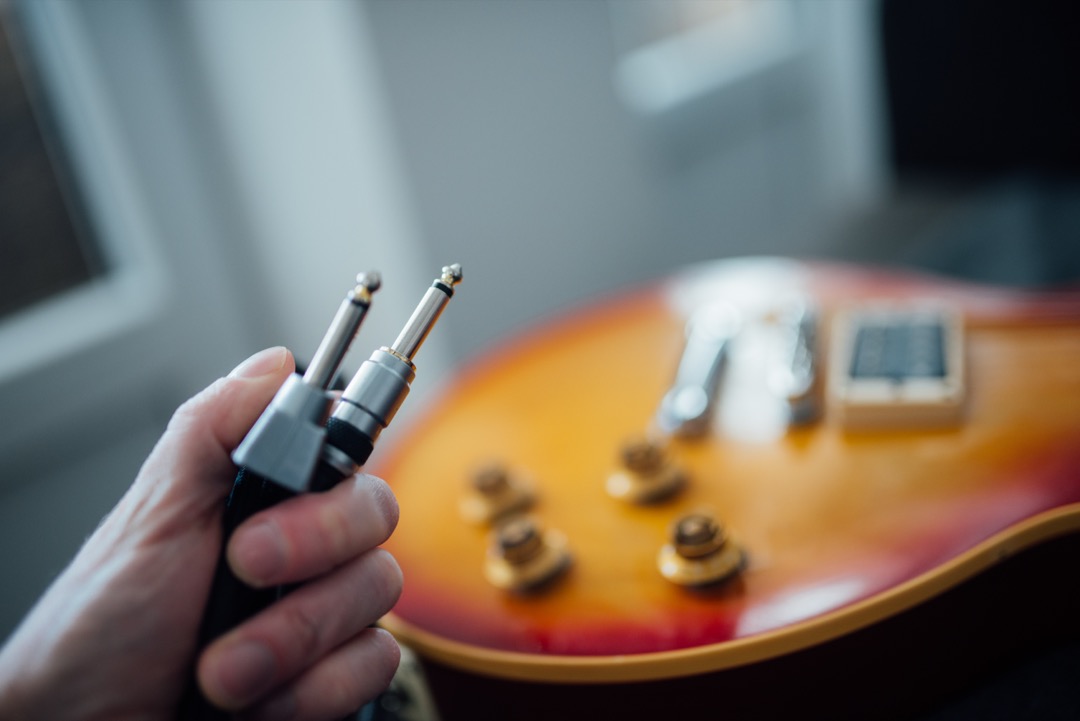
Every audio interface sold to guitarists lists the same three things: a Hi-Z instrument input, 24-bit and 192kHz recording, and a bundle of software. Read four product pages side by side and you would reasonably conclude they are interchangeable boxes with different logos, and that whichever one is on offer this week is the right answer. That is how most people end up buying, and it is why so many of them are quietly disappointed with how their guitar sounds through it a month later.
Two things actually separate these products, and neither appears in a comparison table. The first is what the input stage does to your pickup. A passive humbucker or single-coil is a coil of wire with a resonance, and the impedance the interface presents to it is a load that either lets that resonance breathe or damps it flat. Every guide says look for a Hi-Z input. Almost none says that the advice matters enormously if you play passive and barely at all if you play active, or that one interface here varies its impedance rather than fixing it at a single compromise value. The second is what you can do with the take afterwards. Recording a clean DI is easy; sending that DI back out through a real amplifier later is where the level mismatch nobody warns you about turns a good take into a harsh mess, and exactly one interface on this page solves it in hardware.
I spent years buying gear for other people before I spent much of it on myself, and the guitar counter had a particular pattern. Someone would arrive having read that the Focusrite Scarlett was the interface to buy, buy it, and come back frustrated that their guitar sounded thinner through the computer than through their amp. The Scarlett was not the problem. The advice was, because it was written by people thinking about microphones and it never explained what the thing did or did not do for a pickup. The Scarlett still tops this page, for reasons I set out plainly below, but you should know what you are trading away before you buy it rather than a month afterwards. So this is the guide I would have wanted to hand them: ten interfaces for 2026, every one confirmed buyable, sorted by what they actually do for a guitar rather than by a star rating. If you want the general roundup rather than the guitar-specific one, our best audio interfaces guide covers the whole category, and if your ceiling is around a hundred, start with our best budget audio interfaces page instead, which already has a budget guitar section and a much wider selection at that level.
Find the Best Audio Interface for Guitar for Your Need
Jump straight to the section that matches what you are recording:
- Best audio interfaces for guitar overall
- Best audio interface for electric guitar
- Best guitar audio interface for PC and Windows
- Best audio interface for bass guitar
- Best audio interface for recording a guitar amp
- Best audio interface for acoustic guitar
- Best portable audio interface for guitar
- Best audio interface for guitar and vocals
- More picks by use case
How I Chose These Guitar Audio Interfaces
I should be precise about what this page is and is not. I have not put ten interfaces on a bench with an analyser and measured round-trip latency, and I am not going to publish a millisecond figure I did not measure, which is what separates this from several guides that quote numbers with no methodology attached. What I have is a decade of buying-desk experience with these product lines, hands-on time with several of them in real sessions, and a systematic read of what owners report once a unit has been in weekly use for a year or more.
Four criteria did the sorting, and the first two are the ones competitors skip entirely. Input circuitry came first: not whether there is a Hi-Z jack, because they all have one, but whether anything about that stage was designed with a pickup in mind, and whether it distinguishes between passive and active. Second was the dry-take workflow, meaning whether the interface can send a recorded signal back out to a real amplifier at a level that amplifier will accept, which is the difference between reamping being a feature and reamping being a project involving another purchase.
Third was software permanence, checked per product rather than counted as a bundle. There is a real difference between a licence you keep, a thirty-day trial, a six-month trial, and nothing at all, and lumping those together as included software is how buying guides mislead people without technically lying. Fourth was the honest ceiling of each unit: input count, resolution, whether there is phantom power at all, the things you cannot add later. Every ASIN here was confirmed live and orderable on Amazon at the last check, and every price, rating and review count on this page is a live read rather than an estimate. Where a listing is awkward to buy, as the AXE I/O One currently is, it is said in the section rather than left for you to discover at the checkout.
Best Audio Interfaces for Guitar Overall
These ten interfaces run from a pocket-sized device with a single instrument jack to a four-channel box that will take a band. Each one is reviewed in detail below. Farther down, use-case sections pull two or three together at a time so you can compare and decide quickly for the specific way you record.
Best Overall: Focusrite Scarlett 2i2 4th Gen
The 2i2 is the default recommendation in the entire category, and it deserves most of that reputation. With 2,628 ratings it has the largest review base of any full desktop interface here, second only to the iRig HD 2, which means the failure modes are already documented publicly by somebody who hit them first. Air mode is a genuine presence lift derived from Focusrite ISA console circuitry rather than a treble control, and on a dark humbucker or a boxy acoustic it opens the top end at the input where it does the most good. Easy Start gets a first-time buyer from unboxing to a recorded take without hunting for drivers, which sounds trivial until you have watched somebody give up on recording entirely because they could not work out why nothing was arriving.
Two combo inputs with Hi-Z on both cover the guitar and vocal case, or a DI and a room mic, and the build is the reliable, unglamorous kind that keeps working. That second input is what settles the top slot. A single-input interface records a guitar and nothing else at the same time, and the two things guitarists most often want to add later, a vocal or a microphone on a cabinet alongside the dry DI, both need a channel that is not there. Input count is the one specification you cannot add to an interface afterwards, so it is the one worth buying ahead of.
Be clear about what you are not getting for the money, because it is the reason this is a close call rather than an obvious one. There is nothing guitar-specific about the input stage: no impedance switching, no active and passive distinction, no amp output. There is no bundled amp modelling at all, so budget for that separately. There is no loopback anywhere in the 4th-generation Scarlett line, which is the surprise most buyers hit because the Scarlett is recommended everywhere. And there is no MIDI, which the Rubix22 and the Volt 176 both include for less. If you play passive guitars, already own modelling software and intend to reamp, read the AXE I/O One section below before you buy this, because on the electrical argument it wins and the only thing keeping it out of this slot is how awkward Amazon currently makes it to order.

Focusrite Scarlett 2i2 4th Gen USB-C Audio Interface
by Focusrite
The interface most guitarists should buy: two Hi-Z inputs, the deepest owner history on this page and the least troublesome setup anywhere in the category, even though nothing about the input stage is specifically designed for a pickup.
Pros
- It has the largest review base of any full desktop interface on this page at 2,628 ratings, second only to the iRig HD 2, which means every quirk of this unit is already documented publicly by somebody who hit it first
- Air mode is a presence lift derived from Focusrite ISA console circuitry rather than a treble knob, and on a dark humbucker or a dull acoustic it opens the top end at the input stage
- Easy Start walks a first-time buyer from unboxing to a recorded take without driver hunting, which is the least intimidating setup in the category
- Two combo inputs with Hi-Z on both, so a guitar and a vocal, or a DI and a room mic, both fit in one pass
Cons
- There is no loopback anywhere in the 4th-generation Scarlett line, which rules it out if desktop audio has to reach a recording or a stream alongside your playing
- No MIDI in or out, which is a real omission at this money when the Rubix22 and the Volt 176 both include it for less
- It costs considerably more than the AXE I/O One while offering nothing guitar-specific at the input, despite being the default guitar recommendation almost everywhere
Best Budget: M-Audio M-Track Duo HD
The interesting thing about the M-Track Duo HD is what it does not cut. At this level the standard compromise is to drop to one input, or to omit phantom power, or to cap the converter, and it does none of those. Two combo inputs, each taking a mic, a guitar, a bass or a line source. Switchable 48V phantom power. The full 24-bit and 192kHz converter. Crystal preamps with 55dB of gain. For a guitarist that means a DI’d guitar and a condenser in front of a cabinet, or a guitar and a vocal, both fit in a single pass at a price where every rival forces a second take.
The monitoring is handled properly too. A Direct and USB monitor switch gives you a hardware path from input to headphones, so what you hear while playing comes off the interface itself rather than through the computer’s processing chain. That is the correct arrangement for tracking a clean or acoustic sound, and it is the reason a modest interface can feel more responsive under the hands than an expensive one configured badly. The bundle is Ableton Live Lite, Akai MPC Beats and two months of Splice, which is a production-oriented software package rather than a recording one.
Here is the gap, and it is the one real one. There is no amp sim included at all. Every other interface on this page bundles something, whether permanently or on a trial, and this one bundles nothing on that side. If you already own AmpliTube, Neural DSP, Guitar Rig or anything similar, that costs you nothing and this becomes the value pick on the page by a wide margin. If you own no modelling software, factor that purchase in before you compare it to the AXE I/O One, because the two are much closer once you do. There is also no MIDI, and the review base is thin at 198 ratings.

M-AUDIO M-Track Duo HD USB-C Audio Interface
by M-Audio
The most input capability per pound on this page and the only pick under a hundred with two combo inputs, sold at the cost of having no amp modelling in the box at all.
Pros
- Two combo inputs that each accept a mic, a guitar, a bass or a line source, which at this level is normally where manufacturers cut back to one and force a second recording pass
- Switchable 48V phantom power means a condenser on an acoustic guitar or in front of a cabinet works on arrival rather than after a second purchase
- Crystal preamps supply 55dB of gain and the converter runs the full 24-bit/192kHz, so nothing about the resolution ceiling limits what you can do later
- A Direct and USB monitor switch gives you a hardware monitoring path, so you hear your playing through the interface itself while tracking rather than through the computer
Cons
- No amp sim of any kind is bundled, which is the one real gap against every other pick on this page and means budgeting separately for modelling software
- There is no MIDI in or out, so a controller or a synth needs its own connection
- It has the thinnest review base here alongside the Rubix22 and the Volt 476p, so there is limited long-term owner history to check
Best Upgrade: Universal Audio Volt 276
The Volt 276 is the one interface here that changes the sound before the computer ever sees it, and both mechanisms are analog rather than modelled. Vintage mode is a real preamp circuit derived from the UA 610, the tube preamp lineage Universal Audio built its reputation on, and engaging it thickens and rounds the signal at the input stage. The onboard compressor is based on the 1176 and works the same way: it is evening out the dynamics in hardware, before conversion, in a place no plugin can reach. On a clean electric or a fingerpicked acoustic that combination is the difference between a take you process afterwards and a take that already sounds finished.
Two combo inputs with Hi-Z on both means it also covers the situation the AXE I/O One cannot: a dry DI and a microphone on a cabinet, captured simultaneously, so you can blend them or reamp the DI later. It shares the highest rating on this page with the Scarlett 4i4, on a review base substantial enough that the score reflects something real rather than a handful of enthusiastic early buyers.
Now the part every other guide gets wrong. The Softube Marshall Plexi Classic and Ampeg SVT-VR amp sims that appear on every listing of this interface arrive through a thirty-day UAD Spark trial, not a permanent licence. They are excellent, and after thirty days they stop unless you subscribe. That is a fundamentally different offer from the AXE I/O One’s included software, and it should change how you compare the two. LUNA, the bundled DAW, is macOS only, so a Windows buyer gets nothing from that half. And iPad support needs the external power supply plus a Lightning adapter, so this is iOS-capable rather than genuinely portable.

Universal Audio Volt 276 USB Audio Interface
by Universal Audio
The only interface here with real analog colour and compression in the hardware, and the pick if you want the guitar to sound finished before it reaches the computer.
Pros
- Vintage mode is a real analog preamp circuit modelled on the UA 610 rather than a plugin applied afterwards, so the thickening is printed into the take instead of chased in the mix
- The onboard analog compressor is based on the 1176, and on a clean electric or a fingerpicked acoustic it evens out the dynamics at the input where a plugin cannot reach
- It carries the highest rating on this page alongside the Scarlett 4i4, on a review base large enough that the score means something rather than reflecting a thin sample
- Two combo inputs with Hi-Z on both, so a DI'd guitar and a mic on a cabinet can be captured in a single pass and blended afterwards
Cons
- The bundled Marshall Plexi Classic and Ampeg SVT-VR amp sims arrive through a 30-day UAD Spark trial rather than a permanent licence, which is a materially different proposition from the AXE I/O One's included software
- LUNA, the included DAW, is macOS only, so a Windows user gets none of that half of the bundle
- iPad and iPhone support requires the external Volt power supply plus a Lightning adapter, so it is not a bus-powered mobile solution the way the iRig units are
Best Guitar-Specific Input Stage: IK Multimedia AXE I/O One
On the electrical argument this is the best interface on the page, and it held the top slot here until Amazon changed how it is sold. Almost every interface on this page was designed by people thinking about microphones and then given an instrument jack. The AXE I/O One was designed the other way round, and once you understand what Z-TONE actually does that stops being a marketing distinction. Most Hi-Z inputs present one fixed impedance, chosen as a reasonable compromise across every instrument that might be plugged in. Z-TONE varies it. On a passive guitar that means the pickup’s resonance is not being flattened by the load, and the top end you hear through your amplifier is the top end that reaches the recording. It is not a subtle effect on a bright single-coil.
The active and passive selector beside it is the piece I would point to first, because no other interface here has one. Active pickups have a preamp inside the guitar, so what arrives at the interface is already buffered and does not care much what it is plugged into. Passive pickups care enormously. Having a switch that acknowledges those are two different electrical situations, rather than a single jack that treats them identically, is the whole argument for this box. The dedicated amp output is the second argument: it sends a recorded dry take back out at a level a real amplifier will accept, which is the thing a reamp box normally exists to do and the failure point that ruins most people’s first attempt at the technique.
The software is the third piece and the honest headline. AmpliTube 5 SE and TONEX SE are permanent licences, not a trial. That matters more than it sounds when you compare it against the Universal Audio units below, whose amp sims arrive on a thirty-day window. Buy the AXE I/O One and the modelling half of your rig is settled the day it arrives; buy most of the alternatives and it is a separate line in the budget. If you are assembling the rest of the chain, our best electric guitars and best guitar amps guides cover what usually sits on either side of it.
Now the reason it is not the top pick, and it has nothing to do with the hardware. Amazon has suppressed the featured offer on this listing, which means the product page carries no Add to Cart button and a notice that better prices have been seen elsewhere. The unit is still there and still shipping: behind See All Buying Options there is one offer, sold by IK Multimedia and fulfilled by Amazon, at the price shown here. But an extra click and a warning banner at the moment of purchase is a real cost, and it is not one I am willing to hand the average reader on a top recommendation. If you know what you want, the buying-options route works fine and this is still the interface I would tell a passive-pickup player to own.
The design limits are separate and unchanged. One input, so a guitar and a vocal in the same pass is out of the question and so is a DI alongside a miked cabinet. It has the smallest review base of the Focusrite and IK picks here, so there is less public history to read. And AmpliTube has a real learning curve, which means the bundled software becomes an advantage on the second evening rather than the first.

IK Multimedia AXE I/O One - Professional USB Audio Interface with Z-TONE advanced guitar tone shaping, AmpliTube and TONEX software included, high-resolution recording studio equipment
by IK Multimedia
The only interface here designed around what a pickup does rather than what a microphone does, and the only one that will send a finished dry take back out to a real amp properly, held back from the top slot only by a suppressed buy box that makes it awkward to order.
Pros
- The Z-TONE circuit is a variable-impedance instrument stage rather than the single fixed impedance a generic Hi-Z jack presents, which means a passive humbucker or single-coil is not loaded down and keeps the top end it actually has
- An active and passive pickup selector switch sits on the front panel, and it is the only interface here that acknowledges in hardware that those two pickup types want completely different things from an input
- A dedicated amp output sends a recorded dry take back out to a real amplifier at the right level for reamping, which solves in hardware the single most common failure in that workflow
- AmpliTube 5 SE and TONEX SE are included as permanent licences rather than a trial, so the amp modelling half of a guitar rig is settled the day the box arrives
Cons
- Amazon has suppressed the featured offer on this listing, so there is no Add to Cart button on the product page and you order through See All Buying Options instead, from IK Multimedia's own Amazon-fulfilled listing
- One input only, so there is no route to recording a guitar and a vocal, or a DI and a miked cabinet, in the same pass
- It has the smallest review base of the Focusrite and IK picks on this page, so there is less public owner history to read before committing
Best Single Input with Analog Character: Universal Audio Volt 176
The 176 is the Volt 276 with one input instead of two, MIDI added, and a considerably smaller outlay, and for a very large number of guitarists that is the right set of trades. The Vintage mode preamp circuit is the same 610-derived analog stage, not a reduced version of it, so the character that makes the 276 worth buying is fully present here. If you record one part at a time, which is how most home guitar recording actually happens, the second input on the 276 is capability you are paying for and not using.
MIDI in and out are the quiet addition, and their absence from the more expensive Scarlett 2i2 is worth noticing. For a guitarist that usually means a pedal switcher, a controller for changing patches in modelling software, or a small synth sharing the desk, and having it built in saves a separate box. iOS compatibility is the other bonus, so an iPad session is possible without buying a second interface, though as with the other Volts it wants the external power supply to do it properly.
The reasons to hesitate are consistent with the range. One input closes off the DI-plus-cabinet workflow permanently, and if that is in your plans the 276 is the model to read. The Marshall Plexi Classic arrives on the same thirty-day trial, so the software is a preview rather than an asset. And at 4.4 it carries the lowest rating of the three Volts here, on a smaller base than the 276, which is worth a few minutes of reading owner reports before committing.

Universal Audio Volt 176 USB Audio Interface
by Universal Audio
The Volt 276's preamp character in a single-input box with MIDI added, and the sensible pick for anyone recording one source at a time.
Pros
- The same Vintage mode 610-style preamp circuit as the Volt 276, in a single-input box at a considerably lower outlay, so the analog character is not what you pay the premium for
- MIDI in and out are included, which the Scarlett 2i2 at a higher price omits entirely, and it turns this into the hub for a small pedal or synth rig
- One combo input with Hi-Z suits the way most people actually record a solo acoustic or a single DI'd electric, so nothing is wasted
- iOS compatibility means an iPad session is possible without changing interfaces, which very few desktop units here manage
Cons
- One input only, so a DI and a miked cabinet in the same pass is out of reach and the 276 is the answer if you need that
- The bundled Marshall Plexi Classic arrives on the same 30-day UAD Spark trial rather than as a permanent licence
- Its 4.4 rating sits below both Volt siblings and the Focusrite units on this page, which is worth weighing even though the review base is reasonable
Best Portable: IK Multimedia iRig HD 2
Three thousand eight hundred and seventy-six ratings. That is by a clear margin the largest owner evidence base on this page, and on a device designed to live in a bag and get plugged into whatever is nearest, that history is worth more than any specification. Every quirk this thing has is already described in public by somebody who found it first, which is exactly what you want from a piece of gear you will use in unfamiliar places.
What makes it work is the cable situation, which sounds mundane and is the entire product. USB-C, Lightning and standard USB cables all ship in the box, so it connects to a current iPhone, an older iPad, a Mac and a Windows machine with no adapter purchase and nothing to forget. Inside there is a dedicated guitar preamp rather than a microphone input pressed into instrument service, and the Amp Out jack with a switchable FX or Thru setting means it also works in front of a real amplifier rather than only into a computer. For practising with modelling software on a phone, writing on a train, or capturing an idea in a hotel room, nothing else here is close.
The trade-offs are stark and worth stating plainly. It caps at 24-bit and 96kHz, which is a hard ceiling rather than a preference, though for guitar tracking that is rarely the thing that limits a recording. More significantly there is no XLR socket and therefore no phantom power at all, so this cannot record a microphone under any circumstances. It is a guitar and bass device exclusively. If you need a mic on the same box, the iRig Pro I/O below is the one to read instead.
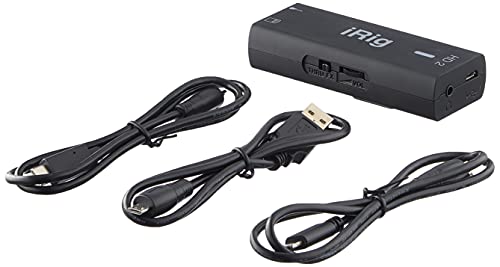
IK Multimedia iRig HD 2 guitar audio interface for iPhone, iPad, Mac, iOS and PC with USB-C, Lightning and USB cables and 24-bit, 96 kHz music recording
by IK Multimedia
The most thoroughly proven guitar interface here and the one that connects to anything you own, provided you accept that it will never record a microphone.
Pros
- With 3,876 ratings it has by a clear margin the largest owner evidence base on this page, which on a portable device that lives in a bag is worth more than a specification advantage
- USB-C, Lightning and standard USB cables are all in the box, so it connects to a current iPhone, an older iPad, a Mac and a PC without a single adapter purchase
- A dedicated guitar preamp rather than a combo input designed for microphones and adapted for instruments, which is the whole reason this exists as a guitar product
- The Amp Out jack with a switchable FX or Thru setting lets you feed a real amplifier from the device, so it works in a practice rig and not only into a computer
Cons
- It caps at 24-bit and 96kHz rather than the 192kHz the desktop units here reach, which is a hard ceiling rather than a setting
- There is no XLR socket and therefore no phantom power at all, so it is a guitar and bass device exclusively and cannot record a microphone
- One input, so it is a solo tracking tool by design with no route to a second source
Best Portable That Also Takes a Mic: IK Multimedia iRig Pro I/O
The Pro I/O exists to answer the one question the iRig HD 2 cannot. Its single combo input takes either a guitar or an XLR microphone with 48V phantom power, which turns a guitar-only travel device into something that can also capture a vocal, an acoustic through a condenser, or a mic in front of a small amplifier. For a songwriter working away from a desk, that is the difference between recording the idea and recording only half of it.
MIDI in and out in a device this size is unusual enough to mention on its own. It means a controller or a pedalboard can talk to an iPad session, which is how a surprising number of people now play live with modelling software. All three cable types are in the box exactly as with the HD 2, so a phone, a tablet and a computer are all covered without adapters, and direct monitoring is handled in hardware so what you hear while playing comes off the device rather than through the host.
Two things to weigh. It still has only one input, which is the limitation people most often assume phantom power removes: it records a guitar or a microphone, never both at the same time. And at 4.2 it carries the lowest star rating on this page, on a review base of 652, so it is worth reading recent owner reports rather than taking the specification list at face value. The 24-bit and 96kHz ceiling is the same as its sibling.
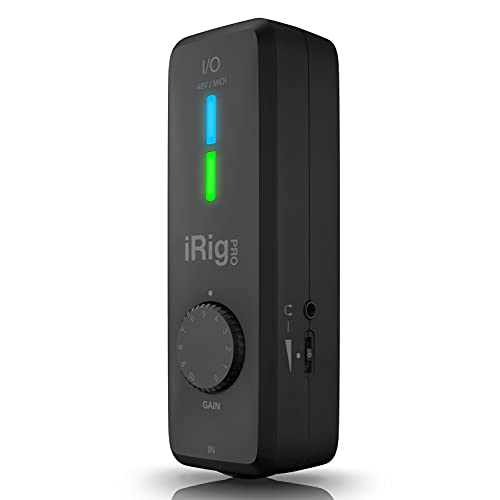
IK Multimedia iRig Pro I/O audio interface for iPhone, iPad, Mac, iOS and PC with USB-C, Lightning and USB cables, 24-bit, 96 kHz recording and guitar, bass and XLR mic inputs
by IK Multimedia
The portable option for someone who records a guitar one day and a vocal or an amp mic the next, as long as it never has to be both in the same take.
Pros
- One combo input that takes either a guitar or an XLR microphone with 48V phantom power, which is the capability the iRig HD 2 lacks entirely and the reason to step up to this one
- MIDI in and out in a device this size is genuinely unusual, and it lets a controller or a pedalboard talk to an iPad session without another box
- USB-C, Lightning and USB cables are all included, so it is ready for a phone, a tablet and a computer out of the box
- Direct monitoring is handled in hardware, so you hear yourself through the interface while tracking rather than waiting on the computer's audio path
Cons
- Still one input, so it records a guitar or a vocal but never both at once, which is the limitation people most often assume phantom power removes
- At 4.2 it has the lowest star rating on this page, and that is worth reading owner reports about before buying
- The 24-bit/96kHz ceiling is the same as the iRig HD 2, below the 192kHz the desktop units reach
Best for Miking an Amp: Focusrite Scarlett 4i4 4th Gen
If a real amplifier is part of your plan, the input count stops being a preference and becomes the specification that decides everything. The classic amp recording setup is a microphone on the cabinet plus a clean DI split off before the amp, so you have the room sound and a dry signal you can reamp or blend later. That is two inputs before anyone sings. Add a vocal and you need three, and every one and two-input interface on this page forces you to split that into separate passes with all the timing and performance compromise that implies.
The 4i4 handles it. Four in, four out, Hi-Z on both front combo inputs, Air mode from the same ISA console lineage on the preamps, and MIDI in and out that the 2i2 beneath it omits. On a microphone in front of a guitar cabinet, Air is genuinely useful rather than decorative: cabinets are dark by design and a presence lift at the input stage recovers definition that is awkward to add later without harshness. It shares the highest rating on this page with the Volt 276, on 565 ratings.
The reasons not to buy it are practical. There is no loopback, the same line-wide gap the 2i2 has, so desktop audio cannot join your recording. The footprint is noticeably larger, which matters if a pedalboard and a laptop are already competing for the desk. And it is more money than a player recording alone needs to spend, with two of those four inputs sitting unused in most home sessions. Buy it because you mic a cabinet, not because four is a bigger number than two.

Focusrite Scarlett 4i4 4th Gen USB-C Audio Interface
by Focusrite
The interface to buy when a real amplifier is part of the plan, because it is the only Focusrite here that can capture the cabinet and the dry DI at the same time.
Pros
- Four inputs and four outputs are enough to take a microphone on a cabinet, a DI'd guitar and a vocal in a single pass, which is the specific setup every one and two-input interface here forces you to split into takes
- It shares the highest rating on this page with the Volt 276, on a review base that is thin by Scarlett standards but not by the standards of most units here
- Air mode from ISA console circuitry is present on the preamps, and on a mic in front of a guitar cabinet it is the difference between a flat capture and a usable one
- MIDI in and out are included, unlike the 2i2 beneath it, so a controller or a pedal switcher joins the setup without a second interface
Cons
- No loopback anywhere in the 4th-generation Scarlett line, exactly as with the 2i2, which is a line-wide gap rather than a decision about this model
- A noticeably larger footprint than the two-input boxes here, which matters if it has to share a desk with a pedalboard and a laptop
- It is more money than a player recording alone actually needs to spend, and two of those four inputs will sit unused in most home sessions
Best for a Noisy Room or a Stage: Roland Rubix22
Every guitarist has met the hum. A tube amp, a laptop, a pedalboard with its own supply, and a wall socket in an old building, and suddenly there is a buzz in the recording that no amount of gating fixes cleanly. The Rubix22 is the only interface on this page that treats that as a design problem rather than your problem, and it does it with ground lift switching, which is unusual at any price and genuinely rare at this one. Lifting the ground breaks the loop that is causing the hum, and it is the difference between a usable take in an awkward room and an hour of moving cables around hoping something helps.
The rest of the design pushes the same direction. Roland shielded this unit extensively and specified low-noise preamps throughout, which is the same problem approached from the other side, and it is why players recording near stage lighting, in basements, or in rooms with questionable wiring keep ending up here. The Hi-Z input for guitar is a dedicated path rather than a switch bolted onto a mic channel, MIDI in and out are included, and the metal chassis is built to a standard most desktop interfaces at this money do not attempt. If you play out and record in different rooms every week, that combination is worth more than a converter specification.
Two honest limitations. Roland Cloud is a six-month trial and then a subscription, so the software is not a permanent asset in the way the AXE I/O One’s bundle is, and you should treat it as a long demo. And the review base is the thinnest on this page at 133 ratings, which is genuinely surprising for a brand with Roland’s history and means there is less public evidence to read than a purchase at this level usually offers.

Roland Rubix22 2-In/2-Out USB Audio Interface
by Roland
The one interface here built for a room that hums, with ground lifts and heavy shielding that nothing else at this level bothers to include.
Pros
- Ground lift switching is the reason this unit is on the page, and it is genuinely unusual at this price: it is the fix for the hum you get when an amplifier, a laptop and a pedalboard are all fighting over an earth path in an awkward room or on a stage
- The design is extensively shielded and low-noise throughout, which is the same problem approached from the other direction and is why guitarists in electrically noisy rooms end up here
- A dedicated Hi-Z input for guitar sits alongside two low-noise mic preamps with XLR combo jacks, so the instrument path is not an afterthought on a mic input
- MIDI in and out plus sturdy compact metal construction, which is a build quality most plastic desktop interfaces at this money do not attempt
Cons
- Roland Cloud is a six-month trial and then a subscription, so the software side is not a permanent asset the way the AXE I/O One's bundle is
- At 133 ratings it has the thinnest review base on this page, which is surprising for a brand this established and means less public history to check
- Nothing about the input circuitry is guitar-tailored beyond the Hi-Z switch, so the tone-shaping argument for the AXE I/O One still applies against it
Best for Bass and Full Bands: Universal Audio Volt 476p
The 476p is the deliberate overspend on this page and it is worth being direct about who should consider it. Four combo inputs with Vintage mode on every single one, so the analog 610-style preamp character is available across the whole session rather than on one channel. Four outputs. Hi-Z on all four inputs rather than just the front pair. That is a full band tracked live, or a guitarist working through several sources at once, with analog colour throughout.
The bass case is the specific one. It bundles the Ampeg SVT-VR alongside the Marshall Plexi Classic, and the SVT is the reference bass amplifier that a very large share of recorded bass has gone through since the seventies. Combined with Vintage mode on the input, this is the most complete option here for anyone whose main instrument is a bass rather than a guitar. Melodyne Essential and the wider plugin bundle push the software side past amp modelling into actual production work. If a real amplifier is still part of the plan, our best bass amps guide covers the other half of that rig.
Three things temper it. It is the most expensive interface on this page by a wide margin, and a solo player recording one part at a time will never engage most of what that buys. The amp sims come through the same UAD Spark trial as the other Volts, so the Ampeg advantage is temporary unless you subscribe, and that is worth saying loudly because the bass modelling is the main reason someone would choose this over the 276. And at 133 ratings it shares the thinnest review base here with the Rubix22.
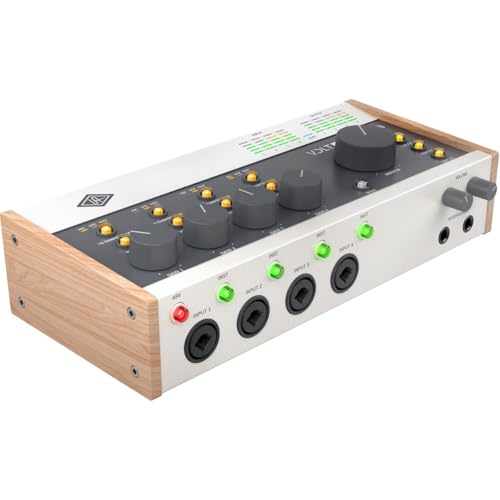
Universal Audio Volt 476p USB Audio Interface
by Universal Audio
Four channels of the same analog Vintage preamp plus the Ampeg bass model, and the deliberate overspend if a whole band or a serious bass rig is the job.
Pros
- Four combo inputs with Vintage mode available on every one of them, so the analog preamp character is not restricted to a single channel the way it is on the 176
- It bundles the Ampeg SVT-VR bass amp sim alongside the Marshall Plexi Classic, which makes it the most complete option here for anyone recording bass as well as guitar
- Melodyne Essential plus a large plugin bundle covers pitch correction and processing, so the software side reaches beyond amp modelling into actual production
- Four inputs and four outputs handle a full band or a multi-source guitar session, with Hi-Z on every channel rather than only the front pair
Cons
- It is the most expensive interface on this page by a wide margin, and a solo player will never engage most of what that money buys
- The amp sims are trial-based through UAD Spark exactly as on the other two Volts, so the bass modelling advantage is temporary unless you subscribe
- At 133 ratings it shares the thinnest review base here with the Rubix22, which is thin evidence for a purchase at this level
Best Audio Interface for Electric Guitar
Electric guitar is where the input stage earns its money, because a passive pickup is the most impedance-sensitive source you are likely to plug into an interface. The three below cover the three sensible approaches: an input designed around the pickup itself, analog colour applied before conversion, and the safe, well-documented general-purpose option that does nothing special for a guitar but does everything else reliably. Which is right for you depends mostly on whether you have modelling software already and whether you intend to reamp.
| Product | Price | Buy |
|---|---|---|
| Focusrite Scarlett 2i2 4th Gen USB-C Audio InterfaceBest electric guitar interface overall Nothing guitar-specific at the input, but two Hi-Z channels, the largest desktop review base here and the gentlest first-time setup | $224.99 | View on Amazon |
| Universal Audio Volt 276 USB Audio InterfaceBest for analog tone before the computer A real 610-style preamp and an 1176-style compressor colour the signal in hardware, before any conversion happens | $299.00 | View on Amazon |
| IK Multimedia AXE I/O One - Professional USB Audio Interface with Z-TONE advanced guitar tone shaping, AmpliTube and TONEX software included, high-resolution recording studio equipmentBest input stage for a passive pickup Variable-impedance Z-TONE input with an active and passive switch and permanent AmpliTube licences, but no Add to Cart button: order it through See All Buying Options | $129.99 | View on Amazon |
Best Guitar Audio Interface for PC (Windows)
On Windows the deciding factor is not sound, it is the driver. Windows has no low-latency audio path worth using on its own, so every interface here depends on a manufacturer-supplied ASIO driver, and how well that driver is maintained determines how small a buffer you can hold while playing through amp sims. Before buying, check the manufacturer’s download page for a driver release inside the last year. The three below all have well-established Windows support, and the first is on the list for a Windows-specific reason: electrical noise from a desktop tower and its power supply is a far more common problem than laptop users realise.
| Product | Price | Buy |
|---|---|---|
| Roland Rubix22 2-In/2-Out USB Audio InterfaceBest for a noisy PC setup Ground lifts and heavy shielding deal with the hum a desktop tower, an amp and a pedalboard generate between them | $209.00 | View on Amazon |
| Focusrite Scarlett 2i2 4th Gen USB-C Audio InterfaceBest documented Windows choice Easy Start onboarding and by far the most public Windows owner history of any full interface here | $224.99 | View on Amazon |
| M-AUDIO M-Track Duo HD USB-C Audio InterfaceBest budget Windows pick Two combo inputs and phantom power on Windows for well under a hundred, though you supply your own amp modelling | $99.00 | View on Amazon |
Best Audio Interface for Bass Guitar
Bass changes two things about the decision. First, the low end demands headroom, so a preamp with clean gain and a converter you can record conservatively into matters more than it does for guitar. Second, the software question narrows: guitar amp sims are everywhere, good bass amp models are rarer, and the Ampeg SVT is the one most engineers reach for. Passive bass pickups are just as impedance-sensitive as guitar pickups, so the Hi-Z argument applies identically here.
| Product | Price | Buy |
|---|---|---|
| Universal Audio Volt 476p USB Audio InterfaceBest bass interface overall The Ampeg SVT-VR model alongside the Plexi, with Vintage mode analog preamps on all four Hi-Z inputs | $439.12 | View on Amazon |
| M-AUDIO M-Track Duo HD USB-C Audio InterfaceBest budget bass interface Two combo inputs that both take bass, 55dB of clean gain and full 24-bit/192kHz headroom under a hundred | $99.00 | View on Amazon |
| Roland Rubix22 2-In/2-Out USB Audio InterfaceBest bass interface for a noisy room Ground lift switching plus a dedicated Hi-Z input, for a bass rig sharing power with an amp and a computer | $209.00 | View on Amazon |
Best Audio Interface for Recording a Guitar Amp
Recording an actual amplifier is the one guitar workflow that a single-input interface cannot do properly. You want the microphone on the cabinet and a clean DI split off before the amp at the same time, so you keep a dry signal to reamp or blend later. That is two channels minimum, three if a vocal is involved, and it needs phantom power for a condenser and enough clean gain for a dynamic on a loud cabinet. One warning that matters more than any of this: never connect an amplifier’s speaker output to an interface input. Use a microphone, or a line or DI output from the amp if it has one.
| Product | Price | Buy |
|---|---|---|
| Focusrite Scarlett 4i4 4th Gen USB-C Audio InterfaceBest for miking an amp overall Four in and four out takes a cabinet mic, a dry DI and a vocal in one pass, with Air mode recovering top end from a dark cabinet | $299.99 | View on Amazon |
| Universal Audio Volt 476p USB Audio InterfaceBest for a full band around the amp Four Vintage mode preamps and four Hi-Z inputs, enough for a band tracked live around the amplifier | $439.12 | View on Amazon |
| Roland Rubix22 2-In/2-Out USB Audio InterfaceBest for a loud or electrically noisy room Ground lifts and shielding for the hum that appears when a tube amp and a computer share a circuit | $209.00 | View on Amazon |
Best Audio Interface for Acoustic Guitar
Acoustic recording splits into two paths that want different things. If you record through the guitar’s own pickup, usually a piezo under the saddle, you are back to an impedance question and a Hi-Z input is essential, because piezos are high-impedance sources and sound thin and brittle into anything else. If you record with a microphone, what matters is clean quiet gain and phantom power, because an acoustic is a quiet source and any noise in the preamp will be audible under it. A compressor at the input helps more on acoustic than on almost anything else, since fingerpicking dynamics swing widely.
| Product | Price | Buy |
|---|---|---|
| Universal Audio Volt 176 USB Audio InterfaceBest for acoustic overall Vintage mode analog preamp warms a thin piezo or a bright condenser at the input, with MIDI included | $178.00 | View on Amazon |
| Focusrite Scarlett 2i2 4th Gen USB-C Audio InterfaceBest for miking an acoustic Air mode adds presence to a boxy acoustic, two combo inputs allow a stereo pair, and phantom power is standard | $224.99 | View on Amazon |
| IK Multimedia AXE I/O One - Professional USB Audio Interface with Z-TONE advanced guitar tone shaping, AmpliTube and TONEX software included, high-resolution recording studio equipmentBest for a piezo pickup Variable-impedance input suits a high-impedance piezo better than a fixed Hi-Z jack, with permanent modelling software | $129.99 | View on Amazon |
Best Portable Audio Interface for Guitar (iPhone and iPad)
Mobile recording is decided almost entirely by cables and power. An interface that needs an external supply is not portable no matter what the listing says, and one that needs a Lightning or USB-C adapter you have to remember is only half portable. The two IK Multimedia units solve this by shipping every cable in the box, which is why they dominate this section despite being technically less capable than the desktop units above. The third option here is for someone who wants a desktop interface that can also do an iPad session rather than a device built for it.
| Product | Price | Buy |
|---|---|---|
| IK Multimedia iRig HD 2 guitar audio interface for iPhone, iPad, Mac, iOS and PC with USB-C, Lightning and USB cables and 24-bit, 96 kHz music recordingBest portable guitar interface USB-C, Lightning and USB cables all included, a dedicated guitar preamp and the largest owner history on this page | $99.99 | View on Amazon |
| IK Multimedia iRig Pro I/O audio interface for iPhone, iPad, Mac, iOS and PC with USB-C, Lightning and USB cables, 24-bit, 96 kHz recording and guitar, bass and XLR mic inputsBest portable pick that also takes a mic The same all-cables approach plus an XLR input with phantom power and MIDI, for guitar or vocals on the move | $169.99 | View on Amazon |
| Universal Audio Volt 176 USB Audio InterfaceBest desktop interface that travels Full 192kHz desktop performance with analog Vintage mode, iOS capable but wanting external power to do it | $178.00 | View on Amazon |
Best Audio Interface for Guitar and Vocals
Recording a guitar and a vocal at the same time needs two inputs, and that eliminates half this page immediately. What separates the survivors is what happens to the voice. A vocal benefits from analog character and compression at the input far more than a DI’d guitar does, since a guitar is usually heading into modelling software that will reshape it anyway. So the priority order flips: buy for the preamp and the phantom power, and treat the Hi-Z input as the box you tick second.
| Product | Price | Buy |
|---|---|---|
| Universal Audio Volt 276 USB Audio InterfaceBest for guitar and vocals overall Two inputs with a 610-style analog preamp and an 1176-style compressor, which flatter a voice more than any plugin at the input | $299.00 | View on Amazon |
| IK Multimedia iRig Pro I/O audio interface for iPhone, iPad, Mac, iOS and PC with USB-C, Lightning and USB cables, 24-bit, 96 kHz recording and guitar, bass and XLR mic inputsBest for guitar or vocals on the move One combo input takes either a guitar or an XLR mic with phantom power, so it covers both jobs but never simultaneously | $169.99 | View on Amazon |
| Focusrite Scarlett 4i4 4th Gen USB-C Audio InterfaceBest for guitar, vocals and an amp mic Four inputs handle a cabinet mic, a dry DI and a vocal in a single pass, with Air mode on the preamps | $299.99 | View on Amazon |
More Guitar Audio Interface Picks by Use Case
A handful of narrower needs come up often enough to deserve a direct answer, and each of these is the pick for one specific job rather than a general recommendation.
| Product | Price | Buy |
|---|---|---|
| M-AUDIO M-Track Duo HD USB-C Audio InterfaceCheapest interface here worth buying Two combo inputs, phantom power and a full 192kHz converter under a hundred, provided you already own modelling software | $99.00 | View on Amazon |
| IK Multimedia AXE I/O One - Professional USB Audio Interface with Z-TONE advanced guitar tone shaping, AmpliTube and TONEX software included, high-resolution recording studio equipmentBest for amp-sim hosts like Guitar Rig A variable-impedance input feeds a cleaner, more accurate signal to any third-party amp sim, plus permanent AmpliTube and TONEX licences, though ordering runs through See All Buying Options | $129.99 | View on Amazon |
| IK Multimedia iRig HD 2 guitar audio interface for iPhone, iPad, Mac, iOS and PC with USB-C, Lightning and USB cables and 24-bit, 96 kHz music recordingBest on a Mac with no driver install Class-compliant over USB-C on macOS with every cable in the box, so it works the moment it is plugged in | $99.99 | View on Amazon |
| Focusrite Scarlett 2i2 4th Gen USB-C Audio InterfaceBest for a beginner Easy Start onboarding, the largest desktop owner history here and two inputs to grow into | $224.99 | View on Amazon |
| Focusrite Scarlett 4i4 4th Gen USB-C Audio InterfaceBest for high-gain metal tones Four inputs let you blend a modelled tone with a miked cabinet, and Air mode recovers definition a dark high-gain cabinet loses | $299.99 | View on Amazon |
Buyer's Guide
Almost every interface sold today has a competent 24-bit converter and a jack labelled Hi-Z, which is why comparing them on a specification sheet gets a guitarist nowhere. Six things actually change what you end up with, and the first two are the ones no other guide explains properly.
Input impedance, and why it matters far more with passive pickups
Every guide tells you to look for a Hi-Z input and then stops, which leaves out the part that decides whether it matters to you. A passive pickup, whether a single-coil or a humbucker, is a coil of wire with a natural resonance, and the impedance the interface presents acts as a load on it. Present too low an impedance and you damp that resonance, which shows up as a loss of top end and a slightly flat, lifeless character that people usually blame on the amp sim afterwards. That is why a genuine high-impedance input, generally quoted at one megohm or more, is the specification that matters for a passive guitar. Active pickups behave completely differently. An EMG-style active set has a preamp built into the guitar, so the signal reaching the interface is already buffered and low-impedance, and it is largely indifferent to what it is plugged into. So the universal advice that Hi-Z matters is really two pieces of advice: it matters a great deal if you play passive, and barely at all if you play active. The AXE I/O One is the only interface here that acknowledges this in hardware with an active and passive selector switch, and its Z-TONE circuit varies the impedance rather than fixing it at one compromise value.
Reamping, and the level mismatch that ruins most first attempts
Reamping means recording a clean dry guitar signal first, then sending that recorded take back out of the computer and through a real amplifier later, so you can change the amp, the settings and the mic position long after the performance is finished. Every guide defines it in a glossary and moves on. The chain is worth spelling out. You record the dry DI take onto its own track. You then route that track to a physical output on the interface, which sends it out at line level. That line-level signal is far hotter than an amplifier's instrument input expects, and it is also low-impedance where the amp is expecting a pickup, so plugging it straight into the front of an amp gives you a harsh, overdriven mess that sounds nothing like the guitar did. The fix is a level and impedance conversion, which is exactly what a reamp box does and exactly what the AXE I/O One's dedicated amp output does in hardware without a separate box. If reamping is part of why you are buying an interface, that output is the feature to shop for, and only one interface on this page has it.
Bundled amp sims, and whether they are actually yours
Software bundles get listed as unqualified wins in every comparison, and the important distinction is never made: permanence. The AXE I/O One includes AmpliTube 5 SE and TONEX SE as licences you keep, so the modelling half of your rig is solved permanently the day the interface arrives. The three Universal Audio Volt units give you the Softube Marshall Plexi Classic and, on the 476p, the Ampeg SVT-VR, but those arrive through a 30-day UAD Spark trial rather than a permanent grant, so they are a taste of a subscription rather than an asset. Roland Cloud on the Rubix22 is a six-month trial and then a subscription, which is a longer runway but the same shape of deal. The Focusrite Scarletts and the M-Audio M-Track Duo HD include no amp modelling at all, which is not a criticism so much as a budgeting fact: if you buy one of those, plan for modelling software as a separate purchase. Work out which of those three categories your shortlist falls into before you compare anything else, because it changes the real cost of getting to a usable guitar tone.
Input count, and the pass you cannot split
One input records a guitar. Two inputs record a guitar and something else at the same time, and that second thing is usually either a vocal or a microphone on an amplifier. The case that decides this is capturing a real cabinet: if you want the miked amp sound and a clean dry DI simultaneously, so you can reamp or blend later, that is two inputs minimum and there is no software workaround. Add a vocal to that and you are at three, which is why the Scarlett 4i4 and the Volt 476p exist on this page. Going the other way, if you record alone, direct, one part at a time, a single input is genuinely sufficient and the money saved is better spent elsewhere. Be honest about which describes you, because input count is the specification people outgrow first and the one thing that absolutely cannot be added to an interface later.
Buffer size, and why guitarists feel it more than anyone
Buffer size is how much audio your computer processes in one chunk, and it is a direct tradeoff. A small buffer means the signal reaches your headphones sooner and the guitar feels immediate under your hands, but it demands more of the processor and will produce clicks if you ask too much. A large buffer is stable and lets you run heavy plugin chains, but the delay between striking a string and hearing it grows until playing in time becomes genuinely difficult. Guitarists are the most sensitive users of this setting there is, because a player tracking directly through amp modelling software is hearing their own performance through the entire computer signal path. Someone recording a miked cabinet has no such problem: they hear the amp in the room and can run whatever buffer keeps the session stable. The hardware answer is direct or hardware monitoring, which most interfaces here provide, routing the input straight to the headphone output without a trip through the computer. It is the correct solution for a clean or acoustic sound and no help at all if the distortion you need to hear lives in a plugin.
Connection, portability and platform
Every interface on this page is USB-C, which on a modern laptop means one cable and no adapter. What differs is what else they will talk to. The two IK Multimedia iRig units ship with USB-C, Lightning and standard USB cables in the box, so they connect to a current iPhone, an older iPad, a Mac and a PC without a single extra purchase, and that is the whole reason to buy one. The Universal Audio Volts support iPad and iPhone but need the external power supply and a Lightning adapter to do it, so they are iOS-capable rather than iOS-portable. The M-Track Duo HD lists Android support alongside Mac, PC and iOS, which is unusual. On the desktop side the practical question is drivers: macOS mostly needs none, while Windows relies on the manufacturer's ASIO driver, and how recently that driver was updated tells you more about how the interface will behave in a year than any specification does. Check the manufacturer's download page for a release inside the last twelve months before you buy.
How to Choose an Audio Interface for Guitar
Start with your pickups, because that question decides how much the headline feature actually matters to you. If you play passive guitars, single-coils or standard humbuckers, the input impedance is a real variable and you should weight it heavily. A passive pickup is a resonant coil, and an input that loads it too hard takes the top end off before anything else in the chain gets a chance. If you play actives, an EMG-style set with an onboard preamp, the signal arriving at the interface is already buffered and low-impedance and it will sound essentially the same through any competent Hi-Z jack. That single distinction reorganises the whole page: passive players should look hard at the AXE I/O One’s variable-impedance input, and active players can ignore the entire argument and buy on input count and software instead.
Next, decide whether a real amplifier is in your plans, now or later. If the answer is no and you intend to record direct through modelling software, one input is genuinely sufficient and you should spend the savings on the software or the guitar. If the answer is yes, you need at least two channels so that a cabinet mic and a dry DI can be captured together, and you should think about reamping, which is where the level mismatch bites. Sending a line-level output straight into an amplifier’s instrument input is far too hot and sounds nothing like the guitar did, which is why the technique needs either a reamp box or an interface with a dedicated amp output built for the job. Exactly one interface here has that output, and if reamping is part of why you are buying, that narrows the decision immediately.
Third, work out what the bundled software actually is. Included does not mean yours. AmpliTube 5 SE and TONEX SE on the AXE I/O One are permanent licences. The Marshall Plexi Classic and Ampeg SVT-VR on the Universal Audio Volts arrive on a thirty-day trial. Roland Cloud on the Rubix22 is six months and then a subscription. The Focusrite Scarletts and the M-Audio bundle no amp modelling at all. Those are four genuinely different offers and treating them as one line item marked software included is how people end up spending more than they planned. Work out the real total for each shortlisted interface including whatever modelling you will need to buy separately, and some of the rankings shift.
Finally, think about how you will monitor. If you track through amp sims, you are hearing your own playing through the entire computer path and you will want the smallest buffer your machine holds without clicking, which makes driver quality a first-order concern rather than a footnote. If you mic a cabinet, you hear the amp in the room and can run a large stable buffer without ever thinking about it. Hardware direct monitoring, which most interfaces here provide, sends the input straight to your headphones without the computer involved, and it is the right answer for a clean or acoustic sound and useless if the distortion you need to hear lives in a plugin. If you want to compare against the wider category before deciding, our best audio interfaces guide covers everything from entry level to serious multi-channel units, and our best multi-effects pedals guide covers the alternative route entirely, since several of those units contain their own interface and connect over USB directly.
The Bottom Line
For most guitarists, the Focusrite Scarlett 2i2 4th Gen is the right answer. Two combo inputs with Hi-Z on both cover the guitar today and the vocal or the cabinet mic you will want to add later, which is the one specification you cannot bolt on afterwards. It has the deepest owner history of any desktop interface here, Air mode does something real to a dark humbucker at the input stage, and the setup is the least likely on this page to end with somebody giving up. Budget separately for amp modelling, because it bundles none.
The IK Multimedia AXE I/O One is the better interface on the electrical argument and the one I would still hand a passive-pickup player who intends to reamp. Its Z-TONE variable impedance and active and passive selector address a problem every other product here ignores, the dedicated amp output solves reamping in hardware, and AmpliTube 5 SE plus TONEX SE arrive as licences you keep rather than a trial you lose. What keeps it out of the top slot is not the hardware: Amazon has suppressed its featured offer, so there is no Add to Cart button and ordering means going through See All Buying Options. If that does not put you off, buy it instead and you will not regret the input stage.
If the outlay is the binding constraint, the M-Audio M-Track Duo HD gives you two combo inputs, phantom power and a full 24-bit and 192kHz converter for well under a hundred, which is more input capability than anything else here at that level. Just budget separately for amp modelling, because it is the one pick on this page that bundles none. At the other end, the Universal Audio Volt 276 is the upgrade that changes what reaches the computer, with a genuine 610-style analog preamp and an 1176-style compressor working before conversion rather than after it.
After that it is about the job in front of you. The Scarlett 4i4 is the one to buy if a real amplifier and a cabinet mic are in the plan. The Volt 176 puts the analog character in a single-input box with MIDI added, the Volt 476p is the bass and full-band answer, the Roland Rubix22 is the only unit here built for a room that hums, and the iRig HD 2 and iRig Pro I/O are the ones that go in a bag with every cable you need already in the box. Settle your pickups and your amplifier plans first, check what the software bundle actually is second, and this decision takes about ten minutes. If you are choosing the instrument at the same time, our best electric guitars guide is the sensible next stop.
Frequently Asked Questions
What does an audio interface actually do for a guitar, and do I need one?
What cable do I need to connect a guitar to an audio interface?
Can I plug a guitar straight into an audio interface?
How do I set up an audio interface for recording guitar?
Can I connect a guitar amp to an audio interface?
Related Articles
14 Best Budget Audio Interfaces of 2026 (Cheap Picks for Guitar, Podcasting and Streaming)
studio-recording
13 Best Audio Interfaces of 2026 (Home Studio, Podcasting, iPad & 8-Channel)
studio-recording
9 Best Guitar Picks of 2026 (Beginner, Acoustic, Metal, Jazz & Bass)
accessories-care
11 Best Podcast Microphones of 2026 (USB, XLR, Budget, Wireless & Beginner)
studio-recording
10 Best Studio Headphones of 2026 for Music Production (Mixing, Recording, Open-Back & Budget)
studio-recording
About the Reviewer

Julian Reyes, MM, Berklee
M.M. Performance, Berklee College of Music
Julian Reyes is a multi-instrumentalist with a Master of Music from Berklee College of Music and over a decade gigging on guitar, bass, and keys. Before founding House of Octave, he spent years as a gear buyer for an independent music retailer, evaluating hundreds of instruments and audio products for the sales floor. He started House of Octave in 2026 to give players honest, hands-on reviews — judged by how gear actually sounds and holds up on stage and in the studio, not by spec sheets or sponsorships.