12 Best Studio Monitors of 2026 for Home Studios, Mixing and Music Production
Berklee-trained musician Julian Reyes picks the 12 best studio monitors of 2026 for home studios, mixing and music production, from desktop pairs to 8-inch.
Updated
The disappointment I see most often in students who have just bought their first studio monitors has nothing to do with the speakers. They put a good pair on a desk pushed into a corner, sit off to one side, and then spend a month wondering why every mix that sounded huge in the bedroom sounds thin and boomy in the car. The monitors were fine. The room, the placement and the choice of woofer size were working against them, and nobody had told them that those three things matter as much as the brand on the front.
I studied at Berklee and spent years buying gear for a retailer before I wrote about it, which means I have unboxed, returned and argued over a great many of these. This guide to the best studio monitors of 2026 is built around the question I ask every student first: what room are they going in, and what are you doing in it? Twelve monitors follow, from 3.5-inch desktop pairs to 8-inch speakers for larger rooms, each matched to a job rather than ranked on a single line. One note before we start, since the term confuses people: these are studio monitor speakers for listening to and mixing audio, not computer monitors or displays. If you still need the box that connects them to your computer, our best audio interface guide covers that half of the chain.
Find the Best Studio Monitors for Your Need
Jump straight to the section that matches your room and your work:
- Best studio monitors overall
- Best budget studio monitors
- Best studio monitors for home studio
- Best small studio monitors
- Best studio monitors for music production
- Best studio monitors for mixing
- Best studio monitors under $500
- More studio monitor picks by use case
How We Chose These Studio Monitors
I want to be clear about what this guide is. I did not put twelve monitors through an anechoic chamber, and I have not produced frequency plots for them. Any roundup that claims to have measured a dozen speakers to a fraction of a decibel in a spare bedroom is asking for a lot of trust. What this guide draws on is years of hands-on time with most of these product lines, from the buying desk and from sessions; the published spec sheets from each manufacturer, which I checked against the makers’ own pages rather than the listing copy; and a close read of what owners report after months of daily use, which is where failure patterns such as hiss, hum, tweeter failures and Bluetooth dropouts show up.
Four questions did most of the sorting. Does the woofer size suit the room it will realistically go in? Does the monitor tell the truth, or does it flatter? Can its rear-panel controls correct for a speaker that has to sit near a wall? And does it connect to the gear a home studio actually owns?
One caution about review counts. The Yamaha HS listings on Amazon share a single review pool across the whole HS family, so the figure shown for the HS5 also counts the HS3, HS4, HS7 and HS8. The PreSonus Eris E5 listing shares its pool with the pair listing in the same way. I treated those numbers as evidence about the family, not about the exact model, and did not lean on them for any ranking. Every ASIN on this page was confirmed live on Amazon, sold new and in stock, before publication.
Best Studio Monitors Overall
These twelve monitors run from first-time desktop pairs to 8-inch speakers that need a proper room. Each is reviewed once below. Further down, the use-case sections pull two or three together so you can compare them for one specific job.
Best Overall: Yamaha HS5 (Pair)
The HS5 is the monitor I would put on most home-studio desks first, and the reason is that it is not pleasant to listen to in the way a hi-fi speaker is. The HS line descends from the Yamaha NS-10, the white-coned speaker that sat on the meter bridge of nearly every commercial studio for decades, and it keeps that idea: a forward midrange that makes problems obvious. A vocal with too much 3kHz sounds harsh on these. A low-mid build-up in the guitars sounds like mud. That is uncomfortable for a week and then it becomes the reason your mixes start travelling to other systems.
The 5-inch woofer is the right size for the rooms most people actually have. A bedroom or a box room cannot support the bass an 8-inch woofer puts out, and the HS5 stays out of trouble there. On the back, the Room Control switch cuts the low end if the speaker has to sit near a wall, and the High Trim switch adjusts the treble for a bright or a dead room. Each speaker is bi-amped, with its own amplifier for the woofer and for the tweeter. The inputs are balanced XLR and TRS only, which means you need an audio interface. If you do not have one yet, start with our best budget audio interface picks, since every one of them has balanced outputs that suit these.
The honest drawbacks are the ones owners mention. The bass rolls off in the low fifties, so check sub-bass on headphones. The HS5 is unforgiving of a bad room, and it will show you the room’s problems as clearly as the mix’s. Some owners report crackle or hum, which in my experience is usually an unbalanced cable or a ground loop rather than the speaker. This listing is a true pair, sold by Amazon.com, so both speakers arrive together.

Yamaha HS5 Powered Studio Monitors (Pair)
by Yamaha
The monitor I would put on most home-studio desks first: honest to the point of being unflattering, sized for a small room, and the voicing a whole generation of producers learned to mix on.
Pros
- An unflattering, mid-forward voicing that exposes a muddy low-mid or a harsh vocal instead of polishing it, which is exactly what a mixing reference is for
- A 5-inch woofer suits the small rooms most home studios actually are, where an 8-inch would mostly excite room modes
- Room Control and High Trim switches on the back let you correct for a wall behind the speaker and for a bright or dead room
- Sold as a true pair by Amazon.com, so both speakers arrive together from one seller with one returns path
Cons
- Bass rolls off early, so sub-bass decisions below the low fifties want headphones or a subwoofer as a second opinion
- Unforgiving of a bad room, and some owners report crackle or hum that usually traces back to cabling or ground loops
- XLR and TRS inputs only, with no RCA, so a consumer source needs an interface or an adapter cable
Best Budget: PreSonus Eris 3.5 (2nd Gen)
The Eris 3.5 is the pair I point beginners toward when the budget is tight and the desk is small. It is not a mixing reference and does not pretend to be. What it does is give a bedroom producer an honest-enough picture of their music, with every connection a first setup is likely to need. Balanced TRS takes an audio interface, RCA takes a mixer or a turntable preamp, and a front 1/8-inch aux takes a phone or a laptop with no adapter. A front headphone output saves you reaching behind the speaker at one in the morning.
The 3.5-inch woven composite woofer sets the limits. PreSonus rates the response from 80Hz, which means the bottom octave of a kick drum and most of a sub-bass line are simply not there. You can write, arrange and learn to balance a mix on these, but you should check the low end on headphones before you call anything finished. The HF and LF tone controls on the back help a pair that has to sit close to a wall or on a reflective desk.
The weak spot in the owner reports is consistency. A minority describe one channel or one tweeter failing within months. That is not common, but it is common enough that I would keep the box until the return window has passed. Treat the Eris 3.5 as a real step up from computer speakers and a sensible first pair, not as the last monitors you will buy.

PreSonus Eris 3.5 Powered Studio Monitors (Pair, 2nd Gen)
by PreSonus
The first pair of real studio monitors for a bedroom producer, with every input a beginner is likely to own and an honest enough voicing to learn on.
Pros
- Plugs into almost anything: balanced TRS for an interface, RCA for a mixer, and a front 1/8-inch aux for a phone or laptop
- A front headphone output saves reaching behind the speaker when you switch to cans late at night
- HF and LF tone controls on the back let you tame a bright desk or a bass build-up in a corner
- Small enough to sit either side of a laptop, which is where most first setups actually live
Cons
- A 3.5-inch woofer cannot reproduce the bottom octave, so kick and bass balance needs checking elsewhere
- A minority of owners report one channel or one tweeter failing within months, so keep the packaging through the return window
- Fine for writing and learning, not a precise enough reference for final mix decisions
Best Upgrade: Yamaha HS8 (Pair)
The HS8 is the HS5 with the bottom octave filled in. Yamaha rates it to 38Hz, so the kick drum’s fundamental and the lower notes of a bass line are present without a subwoofer, and that changes how you mix low end. On the HS5 you guess at the balance between kick and bass and check it elsewhere. On the HS8 you can hear it. Because the voicing is the same forward, unflattering HS sound, anything you learned on the smaller model carries over.
The catch is the room. An 8-inch woofer in a small untreated bedroom will excite room modes, and you will hear peaks and holes that belong to the room, not the music. The HS8 belongs in a medium or larger room, on stands, with real distance from the wall behind it because the port is on the back. In the right space it is a monitor you can keep for a decade. In the wrong one, the HS5 will give you a more accurate picture.
Each speaker is bi-amped with more power than the HS5 has, so it holds together at the levels a full mix session asks for. The rear-panel Room Control and High Trim switches work the same way as on the HS5. Like its sibling, this listing is a true pair sold by Amazon.com.

Yamaha HS8 Powered Studio Monitors (Pair)
by Yamaha
The HS voicing with the bottom octave filled in, for a room large enough to let an 8-inch woofer breathe.
Pros
- An 8-inch woofer reaches into the high thirties, so you can judge kick and bass without adding a subwoofer
- The same mid-forward HS voicing as the HS5, so mixes made on one translate to the other
- Bi-amped with a dedicated amplifier for each driver, which keeps the low end clean at working levels
- Room Control and High Trim switches handle a nearby wall and a bright room the same way as the smaller model
Cons
- Too much low end for a small untreated bedroom, where it will mostly excite room modes
- Large and heavy, so it wants stands rather than a desk shelf
- Rear-ported, so it needs real distance from the wall behind it to keep the bass even
Best Value 5-Inch: JBL 305P MkII
The 305P MkII is the monitor I recommend to people who cannot sit still. JBL’s Image Control Waveguide, the shaped surround around the tweeter, spreads the high frequencies more evenly across the listening area. In practice that means the stereo image does not collapse the moment you lean back, reach for a keyboard or swing round to talk to the singer. On a narrow-dispersion monitor you have to keep your head in one spot. On the 305P there is more room to move.
Each speaker has two Class-D amplifiers, one for each driver, which gives a 5-inch cabinet more headroom than its size suggests. On the back, a boundary EQ switch handles a speaker near a wall and an HF trim switch adjusts the top end. Inputs are balanced XLR and TRS, so it pairs with any interface. The low end reaches the high forties, comparable with the HS5.
Two practical notes. First, this listing is a single speaker, so you need to order two. When I checked, two singles cost less than the pair listing JBL also sells on Amazon, so buy the singles. Second, some owners report audible hiss at idle, mostly when they sit very close in a quiet room. Turning the monitor’s own volume down and running the interface output higher usually reduces it.

JBL 305P MkII 5-Inch Powered Studio Monitor (Single)
by JBL
A 5-inch monitor with a waveguide that forgives an imperfect listening position, bought as two singles to make the pair.
Pros
- JBL's Image Control Waveguide widens the sweet spot, so the stereo image holds when you lean back or shift in your chair
- Dual Class-D amplifiers give a 5-inch cabinet more headroom than its size suggests
- Boundary EQ and HF trim switches cover the two most common home-studio placement problems
- Balanced XLR and TRS inputs work with any audio interface
Cons
- Sold individually, so you need to order two
- Some owners report audible hiss at idle, most noticeable at close range in a quiet room
- A plain, utilitarian cabinet next to the more styled options here
Best for Room Controls: PreSonus Eris E5
The Eris E5 has more ways to adjust for an awkward room than almost anything at this level. Acoustic Space settings reduce the bass build-up when the speaker sits near a wall or a corner, the mid and HF controls shape the upper range, and a low-cut switch lets you hand the bottom end to a subwoofer later without replacing the monitors. For a small studio that cannot be treated properly yet, those controls do real work.
The 5.25-inch Kevlar woofer and 1-inch silk dome tweeter give a clear, fairly neutral picture that owners describe as accurate for the size. Unlike the HS and JBL monitors, it takes XLR, TRS and RCA, so a consumer source plugs straight in. The amplifiers are Class AB rather than Class-D, which is well proven but means the cabinet runs warm to the touch.
The owner reports are mixed on two points. Some describe hum or interference, which is usually solved with balanced cables and by keeping power and audio leads apart. Durability reports are more varied than for the Yamaha and JBL monitors here. This is a single-speaker listing, so order two, and note that its review pool on Amazon is shared with the pair listing.

PreSonus Eris E5 5.25-Inch Powered Studio Monitor (Single)
by PreSonus
A 5-inch class monitor with an unusually full set of room controls, for a small studio that cannot be treated properly yet.
Pros
- Acoustic Space, HF, mid and low-cut controls give more room correction than most monitors at this tier
- XLR, TRS and RCA inputs, so it connects to an interface or a consumer source without adapters
- A 5.25-inch Kevlar woofer that owners describe as clear and accurate for a small studio
- The low-cut switch makes it easy to hand the bottom end to a subwoofer later
Cons
- Sold individually, so a stereo setup means two orders
- Some owners report hum or interference, which is worth ruling out with balanced cables first
- Class AB amplification runs warm, and durability reports are mixed
Best for Placement Near a Wall: Kali Audio LP-6 V2
Most monitors at this level have their bass port on the back, and a rear port near a wall pumps bass into the corner and back into the room. The LP-6 V2 puts its port on the front. That does not make it immune to boundary effects, but it tolerates a desk pushed against a wall far better than a rear-ported design, which is where many home setups end up.
Kali was founded by engineers who came from JBL, and the LP-6 shows it. The tweeter sits in a waveguide for even dispersion, the 6.5-inch woofer reaches the high forties, and the voicing is flat enough that owners say mixes translate well to cars and earbuds. The best touch is on the back: a set of dip switches for boundary EQ with a printed chart showing which settings to use for a desk, a wall, a corner or free-standing placement. It is the quickest correct setup I know of at this level. Guitarists who record direct also like it, since the flat midrange gives an honest picture of amp sims and DI tones. If that is your use, pair it with one of our best audio interfaces for guitar, since a proper Hi-Z input matters as much as the speakers.
The drawbacks are real. Owners disagree about how loud it will go before it runs short of headroom, so do not expect it to fill a big room. The review record on this listing is thin, so long-term reliability is less documented than for older models. Auto-standby can switch it off during quiet passages, which some people find irritating. It is sold as a single speaker.

Kali Audio LP-6 V2 6.5-Inch Powered Studio Monitor (Single)
by Kali Audio
A flat, translatable 6.5-inch monitor with a front port and a printed setup chart, built for rooms where the speakers cannot move far from the wall.
Pros
- A front-firing port means it tolerates sitting closer to a wall than a rear-ported design
- Boundary EQ dip switches with a placement chart printed on the back, so setup takes minutes rather than guesswork
- A flat, neutral voicing that owners say translates well to cars and earbuds
- XLR, TRS and RCA inputs cover every source a home studio is likely to have
Cons
- Owners disagree about how loud it will play before it runs out of headroom
- A thin review record on this listing, so long-term reliability is less documented than the older names here
- Auto-standby can put it to sleep during quiet passages and some owners find that irritating
Best for Detailed Highs: ADAM Audio T7V
The T7V is the monitor for people who want to hear exactly what is happening in the top octave. ADAM’s U-ART folded ribbon tweeter works differently from a soft dome. Its pleated diaphragm squeezes air out like an accordion, which gives very fast transients and resolves sibilance, reverb tails and cymbal detail that domes tend to smooth over. Owners call it a truth-teller, and for vocal editing and for setting de-essers and reverbs that is exactly what you need.
The 7-inch polypropylene woofer reaches the high thirties, enough to judge kick and bass level in most rooms without a subwoofer. High and low shelf filters on the back adjust for a bright room or a wall behind the speaker. The amplifiers are separate for each driver, and this listing is sold by Amazon.com.
Three practical cautions. The T7V has XLR and RCA inputs but no TRS jack, so if your interface has TRS outputs, buy TRS-to-XLR cables. The port is on the back and the cabinet is deep, so it needs clearance from the wall and a desk or stands that can take it. And it is sold as a single speaker, so a stereo pair is two orders.

ADAM Audio T7V 7-Inch Powered Studio Monitor (Single)
by ADAM Audio
A ribbon-tweeter mixing monitor that tells you exactly what is happening in the top octave, with enough woofer to handle the bottom.
Pros
- The U-ART folded ribbon tweeter resolves reverb tails, sibilance and cymbal detail that soft domes tend to smooth over
- A 7-inch woofer reaches the high thirties, enough to set kick and bass level without a subwoofer in most rooms
- High and low shelf filters let you correct for a bright room or a wall behind the speaker
- Sold by Amazon.com, so returns and warranty are straightforward
Cons
- No TRS input, only XLR and RCA, so check your interface outputs or buy the right cable
- Rear-ported and deep, so it needs clearance from the wall and a sturdy desk or stands
- Large for a small desk, and sold individually
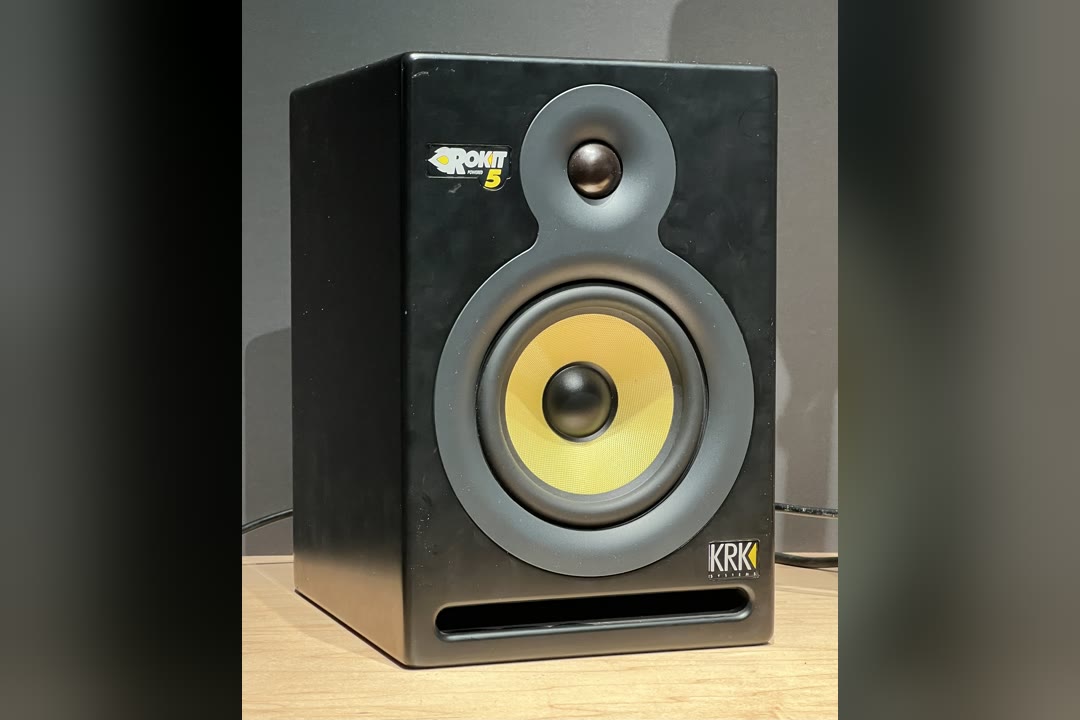
Best for Bass-Heavy Genres: KRK Rokit 5 G5 (Pair)
The yellow woofer is the most recognisable cone in home studios, and the Rokit has been the default for electronic, hip-hop and DJ producers for a long time. The G5 is the fifth generation, with a woven Kevlar woofer, a new 1-inch silk dome tweeter and Class-D amplifiers for each driver. KRK rates it at 54Hz to 30kHz within 3dB, which puts its usable bass in a similar range to the HS5 and the 305P.
The useful change in this generation is the voicing. Three modes, Mix, Focus and Create, let one pair act as a flatter reference for mixing and a more energetic speaker for writing, and a set of boundary and tuning EQ combinations helps a speaker that sits on a desk or near a wall. The slot port is on the front, and foam wedge isolation pads come in the box, which saves a separate purchase. Inputs are a balanced XLR/TRS combo jack.
The fair criticisms are about signature and value. Even in its flatter mode the Rokit leans slightly toward the bass compared with a strict reference, which suits the genres it is popular with but is worth knowing if you mix acoustic music. Owners are split on value against similarly sized competitors. The G5 is also new enough that its review record is thin. This listing is a true pair sold by Amazon.com.

KRK Rokit 5 G5 Powered Studio Monitors (Pair)
by KRK
The fifth generation of the yellow-cone monitor that electronic, hip-hop and DJ producers have used for decades, now with switchable voicing.
Pros
- Three voicing modes, Mix, Focus and Create, so one pair can be honest for mixing and more energetic for writing
- Boundary and tuning EQ combinations that help a speaker sitting on a desk or near a wall
- Foam wedge isolation pads in the box, which decouple the cabinet from the desk without a separate purchase
- A front slot port and Class-D amplification that owners describe as loud, crisp and solid in the low end
Cons
- The signature leans slightly bass-forward compared with a strictly flat reference
- Owners are split on whether it is good value against similarly sized competitors
- The G5 is a recent generation with a thin review record so far
Best Desktop Monitors: ADAM Audio D3V (Pair)
The D3V is designed for the space between a keyboard and a screen. Each speaker uses a 3.5-inch aluminium woofer with two passive radiators on the sides, unpowered cones that move with the air pressure inside the cabinet and reinforce the bass. That is how a cabinet this small reaches the high forties. ADAM uses its D-ART folded ribbon tweeter here, a smaller version of the design on the T7V, so the top end is detailed for a desktop system.
The connections are built for a computer. A USB-C audio input lets it play straight from a laptop with no interface, which makes it a tidy setup for editing, podcast production or composing with a controller. Balanced TRS inputs take an interface when you add one. If you are building a simple podcast or streaming desk, pair it with one of our best USB microphones and the whole chain runs over USB. The included stands angle the speakers up toward your ears, and a threaded insert underneath fits a mic stand.
There is no Bluetooth, so phone playback needs a cable. Auto-sleep kicks in during quiet listening, which annoys some owners. And it is a significant outlay for a 3.5-inch system. You are paying for the passive radiators, the ribbon tweeter, the USB-C input and the build, not for woofer size. It is a true pair sold by Amazon.com.

ADAM Audio D3V Active Desktop Studio Monitors (Pair)
by ADAM Audio
A desktop monitor system designed for the space between a keyboard and a screen, with USB-C audio and a ribbon tweeter.
Pros
- Two side-firing passive radiators per speaker give a 3.5-inch woofer tighter, deeper bass than its size suggests
- USB-C audio input means it can run straight from a computer with no interface in between
- Detachable stands angle the speakers up toward your ears on a desk, and a threaded insert fits a mic stand
- ADAM's D-ART folded ribbon tweeter brings the brand's detailed top end to a desktop-sized cabinet
Cons
- No Bluetooth, so phone playback needs a cable
- Auto-sleep can kick in during quiet listening and some owners find it annoying
- A significant outlay for a 3.5-inch desktop system
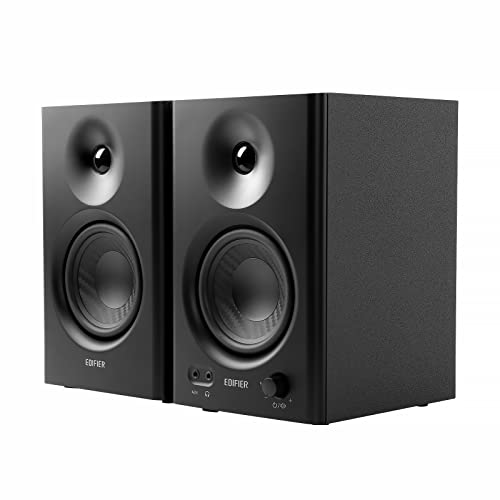
Best Value Pair: Edifier MR4
The MR4 is the pair I suggest when someone needs one set of speakers for production, practice and everyday listening, and does not want them to look like studio gear. The MDF cabinets are good-looking and better at controlling resonance than plastic. A front knob switches between a Monitor mode for flatter studio work and a Music mode for casual listening, which is an honest way to handle a speaker that does both jobs.
One speaker holds the amplifier and connects to the other with speaker wire, a common design at this level. The inputs cover TRS, RCA and a 1/8-inch aux, and there is a front headphone output. Edifier rates the 4-inch woofer down to 60Hz, a step below the Eris 3.5, and owners consistently describe the sound as crisp for the size. Keyboard players who practise on headphones often want speakers for playing to a room. If that is you, these sit well beside the instruments in our best digital piano guide.
The limits are volume and precision. The MR4 is a near-field desk speaker and runs out of headroom if you try to fill a room. Some owners report woofer crackle at higher volumes. It is a good starter pair and a good second pair, but it is not the tool for final mix decisions.
Edifier MR4 Powered Studio Monitor Speakers (Pair)
by Edifier
A good-looking 4-inch pair with a studio mode and a music mode, for a desk that does both jobs.
Pros
- A Monitor mode for flatter studio work and a Music mode for casual listening, switched from the front knob
- TRS, RCA and 1/8-inch aux inputs plus a front headphone output
- MDF cabinets that look good on a desk and control resonance better than plastic
- Owners consistently describe the sound as crisp and clean for the size
Cons
- Maximum volume is modest, so it suits near-field desk listening rather than filling a room
- Some owners report woofer crackle at higher volumes
- A good starter pair, not a precision mixing tool
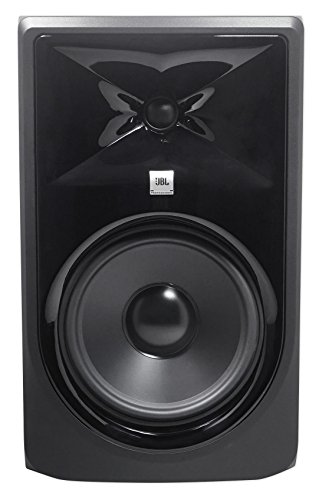
Best 8-Inch for Big Low End: JBL 308P MkII
The 308P MkII is the 305P scaled up. It has the same Image Control Waveguide for a wide sweet spot, an 8-inch woofer and JBL’s Slip Stream port on the back. JBL rates it at 45Hz to 20kHz within 3dB, with usable output below that. Dual Class-D amplifiers give each speaker plenty of headroom, which matters to DJs practising sets and producers who want to feel the low end of a track without a subwoofer.
The same warning applies as for the HS8. An 8-inch woofer in a small untreated room will boom, and you will mix the room rather than the track. The 308P needs space, stands or a deep desk, and distance from the wall behind it. The boundary EQ and HF trim switches help, but they cannot turn a box room into a medium one.
It is sold as a single speaker, and owners report the same idle hiss as the 305P, again mostly at close range in a quiet room. In a room large enough for it, a pair of 308Ps and the HS8 are the two direct routes on this page to full-range monitoring without a sub.
JBL 308P MkII 8-Inch Powered Studio Monitor (Single)
by JBL
A large-room 8-inch monitor with JBL's waveguide, for DJs and producers who need to feel the low end without a subwoofer.
Pros
- An 8-inch woofer and Slip Stream port deliver real low end without adding a subwoofer
- The same Image Control Waveguide as the 305P, so the sweet spot stays wide in a bigger room
- 112W of dual Class-D power per speaker gives it headroom for DJ practice and loud sessions
- Boundary EQ and HF trim handle placement near walls and a bright room
Cons
- Too much bass for a small untreated room, where the low end will boom
- A big cabinet that needs stands or a deep desk
- Shares the idle hiss reports of the smaller 305P
Best Bluetooth Studio Monitors: PreSonus Eris 4.5BT (2nd Gen)
The Eris 4.5BT is a step up from the 3.5 with one addition that suits a shared desk: Bluetooth 5.0. Stream a reference track from your phone to compare against your mix, play music when you are not working, and switch to the wired TRS or RCA inputs when you are. The 4.5-inch woofer gives more body than the 3.5-inch model, and PreSonus rates the response down to 70Hz. A front aux input and headphone output make switching quick.
Bluetooth is for playback, not production. It adds latency, so recording, playing a MIDI controller or tracking vocals should all run through the wired inputs from your interface. Some owners report Bluetooth dropouts developing over time, which is worth knowing if wireless is the main reason you are buying.
The low end is still limited for mixing bass-heavy music, so treat the 4.5BT as a versatile desk pair rather than a mixing reference. For a student flat, a dorm room or a home office that doubles as a studio, it is the only pair on this page with Bluetooth built in.

PreSonus Eris 4.5BT Bluetooth Studio Monitors (Pair, 2nd Gen)
by PreSonus
A small studio pair that also takes Bluetooth, for a desk that is a music player as often as a workstation.
Pros
- Bluetooth 5.0 for streaming reference tracks from a phone, alongside wired TRS and RCA inputs
- A 4.5-inch woofer gives noticeably more body than the 3.5-inch Eris
- Front aux input and headphone output for quick switching
- One pair covers music listening, video calls and production on a shared desk
Cons
- Some owners report Bluetooth dropouts developing over time
- Bluetooth adds latency, so track and play through the wired inputs
- Limited low end for mixing bass-heavy music
Best Budget Studio Monitors
Cheap studio monitors are worth buying only if they are honest. Computer speakers and most consumer Bluetooth speakers lift the bass and the treble to sound impressive in a short demo, and mixing on that voicing gives you thin, dull results everywhere else. Affordable studio monitors trade some volume and low end for a flatter picture, and that trade is the whole point.
Of these three, the Eris 3.5 and the Edifier MR4 are sold as pairs and the JBL 305P MkII is sold as a single, so remember to buy two of the JBL. If a microphone is ever live in the room, keep your volume low and track on headphones whatever you choose.
| Product | Price | Buy |
|---|---|---|
| PreSonus Eris 3.5 Powered Studio Monitors (Pair, 2nd Gen)Best budget pair overall Every input a beginner owns, including a front aux and headphone jack, in a pair small enough for a laptop desk | $99.99 | View on Amazon |
| Edifier MR4 Powered Studio Monitor Speakers (Pair)Best budget pair for looks and casual listening MDF cabinets with a Monitor mode and a Music mode, for a desk that is a workstation and a hi-fi | $129.99 | View on Amazon |
| JBL 305P MkII 5-Inch Powered Studio Monitor (Single)Best budget pick for a wide sweet spot A waveguide that keeps the stereo image stable when you move; buy two singles to make the pair | $99.00 | View on Amazon |
Best Studio Monitors for Home Studio
A home studio usually means a bedroom or a spare room with no acoustic treatment, a desk against a wall and one pair of speakers doing every job. For home recording and mixing in that space, I want a woofer between 5 and 6.5 inches, a voicing that tells the truth, and rear-panel controls that can correct for the wall.
All three below meet those conditions in different ways. The HS5 is the reference voicing, the Eris E5 has the widest set of room controls, and the Kali LP-6 V2 has its port on the front, so a desk pushed against the wall is less of a problem.
| Product | Price | Buy |
|---|---|---|
| Yamaha HS5 Powered Studio Monitors (Pair)Best home studio monitor overall An honest, mid-forward voicing sized for a small room, with Room Control and High Trim switches on the back | $399.98 | View on Amazon |
| PreSonus Eris E5 5.25-Inch Powered Studio Monitor (Single)Best for an untreated home room Acoustic Space, mid, HF and low-cut controls correct for a room that has not been treated yet | $109.99 | View on Amazon |
| Kali Audio LP-6 V2 6.5-Inch Powered Studio Monitor (Single)Best for a desk against a wall A front port and a printed boundary-EQ chart make a wall-side desk setup quick and correct | $249.00 | View on Amazon |
Best Small Studio Monitors
Small studio monitors are for small rooms and small desks, and they are not a compromise there. A compact speaker close to your ears in a small room gives a cleaner picture than a large one, because it puts out less of the bass that small rooms handle badly. The trade is the bottom octave, so check sub-bass on headphones.
The ADAM D3V does the most with its size, using passive radiators for bass and USB-C for a direct computer connection. The Eris 3.5 and the Edifier MR4 are the simpler routes for small rooms, and both are sold as pairs.
| Product | Price | Buy |
|---|---|---|
| ADAM Audio D3V Active Desktop Studio Monitors (Pair)Best compact monitors overall Passive radiators give a 3.5-inch woofer real bass, and USB-C audio runs it straight from a computer | $349.99 | View on Amazon |
| PreSonus Eris 3.5 Powered Studio Monitors (Pair, 2nd Gen)Best compact pair for beginners A 3.5-inch pair with TRS, RCA and front aux inputs that fits either side of a laptop | $99.99 | View on Amazon |
| Edifier MR4 Powered Studio Monitor Speakers (Pair)Best compact pair for mixed use A 4-inch pair with Monitor and Music modes and a front headphone output | $129.99 | View on Amazon |
Best Studio Monitors for Music Production
Music production asks for a monitor you can work on for hours, writing, arranging and mixing in the same session. That means a voicing you trust, enough low end to place the kick and bass, and enough comfort at moderate volume that you do not drift louder as your ears tire.
Which of these three suits you depends on the genre. The HS5 is the neutral, mid-forward choice for most styles. The KRK Rokit 5 G5 suits electronic and hip-hop producers who want the low end to feel present while writing. The ADAM T7V is the one for detail in the high end.
| Product | Price | Buy |
|---|---|---|
| Yamaha HS5 Powered Studio Monitors (Pair)Best for music production overall The forward HS voicing makes problems obvious in every genre, and the 5-inch woofer suits a small room | $399.98 | View on Amazon |
| KRK Rokit 5 G5 Powered Studio Monitors (Pair)Best for electronic and hip-hop production Three voicing modes let one pair act as a flatter mixing reference or a more energetic writing speaker | $398.00 | View on Amazon |
| ADAM Audio T7V 7-Inch Powered Studio Monitor (Single)Best for detail-heavy production The U-ART ribbon tweeter resolves reverb tails and sibilance, and the 7-inch woofer handles the bass | $289.99 | View on Amazon |
Best Studio Monitors for Mixing
Mixing and mastering need the most accurate monitor you can fit in the room. That means a flat response so that nothing is hidden, enough low-frequency extension to make bass decisions without guessing, and stable imaging so your panning and reverb choices hold up on other systems. Room size still decides the woofer.
The ADAM T7V is the pick for detail in the highs, the Kali LP-6 V2 is the flat, translatable choice for a wall-side desk, and the Yamaha HS8 is for rooms large enough to support an 8-inch woofer.
| Product | Price | Buy |
|---|---|---|
| ADAM Audio T7V 7-Inch Powered Studio Monitor (Single)Best for mixing overall A ribbon tweeter that exposes harshness and reverb tails, with a 7-inch woofer reaching the high thirties | $289.99 | View on Amazon |
| Kali Audio LP-6 V2 6.5-Inch Powered Studio Monitor (Single)Best flat mixing monitor for a small room A flat voicing that owners say translates well, with boundary EQ for placement near a wall | $249.00 | View on Amazon |
| Yamaha HS8 Powered Studio Monitors (Pair)Best for mixing low end in a larger room The 8-inch HS reaches 38Hz, so kick and bass balance can be judged without a subwoofer | $797.98 | View on Amazon |
Best Studio Monitors Under $500
These three are all sold as true pairs, so the price shown is for both speakers and the whole pair sits under the line. Single-speaker listings such as the T7V and the Kali have to be doubled before they can be compared with these.
The HS5 is the reference choice, the KRK Rokit 5 G5 is the one with switchable voicing for writing and mixing, and the ADAM D3V is for desktop and computer setups that need USB-C audio.
| Product | Price | Buy |
|---|---|---|
| Yamaha HS5 Powered Studio Monitors (Pair)Best pair in this range overall The HS reference voicing in a 5-inch pair sized for a home studio | $399.98 | View on Amazon |
| KRK Rokit 5 G5 Powered Studio Monitors (Pair)Best pair for bass-heavy genres Mix, Focus and Create voicing modes plus foam isolation pads in the box | $398.00 | View on Amazon |
| ADAM Audio D3V Active Desktop Studio Monitors (Pair)Best desktop pair Passive radiators, a ribbon tweeter and a USB-C input in a desk-sized pair | $349.99 | View on Amazon |
Best Studio Monitors by Use Case
A few narrower needs come up often enough to deserve a direct answer. Each row is the pick for one job.
| Product | Price | Buy |
|---|---|---|
| Edifier MR4 Powered Studio Monitor Speakers (Pair)Best under $200 A 4-inch pair with a studio mode, a music mode and every common input | $129.99 | View on Amazon |
| PreSonus Eris E5 5.25-Inch Powered Studio Monitor (Single)Best under $300 Priced as two singles, the Eris E5 still makes a full stereo pair with room controls | $109.99 | View on Amazon |
| Yamaha HS8 Powered Studio Monitors (Pair)Best high-end under $1,000 The 8-inch HS for rooms big enough to support its low end | $797.98 | View on Amazon |
| PreSonus Eris 3.5 Powered Studio Monitors (Pair, 2nd Gen)Best for beginners Simple setup, front aux and headphone jack, and an honest enough voicing to learn on | $99.99 | View on Amazon |
| JBL 305P MkII 5-Inch Powered Studio Monitor (Single)Best 5-inch A waveguide for a wide sweet spot and headroom from dual Class-D amps | $99.00 | View on Amazon |
| JBL 308P MkII 8-Inch Powered Studio Monitor (Single)Best 8-inch Real low end without a subwoofer for larger rooms and practice sets | $149.00 | View on Amazon |
| PreSonus Eris 4.5BT Bluetooth Studio Monitors (Pair, 2nd Gen)Best Bluetooth Bluetooth 5.0 for playback, with wired inputs for production | $159.99 | View on Amazon |
| Kali Audio LP-6 V2 6.5-Inch Powered Studio Monitor (Single)Best for guitar A flat midrange gives an honest picture of amp sims and DI guitar tones | $249.00 | View on Amazon |
| KRK Rokit 5 G5 Powered Studio Monitors (Pair)Best for DJs The yellow-cone KRK sound, front port and isolation pads for a DJ booth or desk | $398.00 | View on Amazon |
| ADAM Audio D3V Active Desktop Studio Monitors (Pair)Best for PC and desktop USB-C audio straight from a computer, angled desk stands and a ribbon tweeter | $349.99 | View on Amazon |
Buyer's Guide
Powered studio monitors look alike on a spec sheet, so the decision comes down to six things that change what you hear in your own room.
Woofer Size and Room Size
Match the woofer to the room, not to your ambition. A 3.5 to 5-inch woofer suits a bedroom or a small office, a 6.5 to 7-inch woofer suits a medium room, and an 8-inch woofer needs space to keep its bass even. Too much woofer in a small untreated room mostly excites room modes and makes the low end harder to judge, not easier.
Near-Field Placement
Near-field studio monitors are designed to be heard at roughly one to two metres, so the direct sound from the speaker arrives well ahead of the reflections from the room. Set the two monitors and your head as an equilateral triangle, tweeters at ear height, and angle the speakers in so they point at your ears.
Powered (Active) Amplification
Every monitor here is active, with built-in amplifiers matched to its drivers. Bi-amped designs give the woofer and the tweeter separate amplifiers, which keeps the low end from muddying the highs at working levels. Class-D amps run cooler and lighter, while Class AB amps run warmer but are well proven.
Flat Frequency Response
A studio monitor should not flatter the music. A flat response shows you a harsh vocal or a boomy bass line so you can fix it, which is why a good monitor can sound less exciting than a hi-fi speaker in a demo. Compare published frequency figures with care, because brands measure them to different tolerances.
Room Controls (Boundary EQ, HF Trim, DSP)
Rear-panel switches correct for the room you actually have. Boundary or room-control EQ trims the bass build-up from a wall behind the speaker, HF trim tames a bright room or lifts a dull one, and DSP voicing modes on some models store whole presets. Set them for your placement before you judge the sound.
Inputs and Single vs Pair Pricing
Check that the inputs match your gear: balanced XLR or TRS for an audio interface, RCA or 1/8-inch aux for consumer sources, USB-C on some desktop systems. Then check whether the listing is a pair or a single speaker, because a single-speaker price has to be doubled before it can be compared with a pair.
How to Choose the Best Studio Monitors
The woofer size you need depends on the room and the listening distance more than on your ambitions. In a bedroom or small office where you sit about a metre from the speakers, a 3.5 to 5-inch woofer is right, and the HS5, 305P, Rokit 5 and D3V all belong here. A medium room with a listening distance of one to two metres can support a 6.5 or 7-inch woofer like the Kali and the T7V. An 8-inch woofer, as on the HS8 and 308P, needs a larger room and space behind the speaker. Put too big a woofer in a small room and the room’s modes, the frequencies that build up and cancel between parallel walls, will dominate what you hear. You will hear more bass, but you will not hear it accurately.
Count every price as a pair. Five of the twelve monitors on this page are sold as single speakers and seven as pairs, and a listing price does not always make that obvious. Before you compare, double every single-speaker price. That is also why the price-band section above lists only true pairs.
A bass port on the back of a cabinet interacts with the wall behind it. Too close and the bass swells and smears. Leave at least a hand’s width, more if you can, and then use the monitor’s boundary or room-control switch to trim what is left. If the desk has to sit against a wall, a front-ported design like the Kali LP-6 V2 or the KRK Rokit 5 G5 is easier to live with.
For the listening position, use the 38% rule as a starting point. In a rectangular room, sitting about 38% of the way along the room’s length, measured from the front wall, tends to avoid the worst bass peaks and nulls. The exact centre of the room is often the worst place to sit, because several room modes cancel there. Start at 38%, set the monitors and your head as an equilateral triangle with the tweeters at ear height, then move a few centimetres at a time while you listen to a bass line you know well.
Decouple the speakers from the desk. A monitor sitting directly on a desk passes vibration into it, and the desk resonates along with the bass. Foam isolation pads, the kind that come with the KRK Rokit 5 G5, or proper stands stop that and let you tilt the speaker so the tweeter points at your ears. It is a small change with a large effect on the low end.
Finally, check the inputs before you buy. Most audio interfaces have balanced TRS outputs, which suit nearly every monitor here. The ADAM T7V is the exception, with XLR and RCA only, so it needs TRS-to-XLR cables. If you plan to run speakers straight from a computer, the ADAM D3V has USB-C. And keep a good pair of headphones for late nights and for checking low end. Our best studio headphones guide covers the pairs that suit tracking and mixing.
Final Verdict
For most home studios, the Yamaha HS5 (Pair) is the best studio monitor to buy. It is honest to the point of being unflattering, its 5-inch woofer suits the rooms most people actually work in, its rear-panel switches handle a nearby wall, and it is the voicing a generation of producers learned to mix on. Pair it with a decent interface and you have a setup you can grow into for years.
If the budget is tight, the PreSonus Eris 3.5 (2nd Gen) is the sensible first pair, with every input a beginner owns and an honest enough sound to learn on. If your room is larger and you want to mix low end without a subwoofer, the Yamaha HS8 (Pair) is the upgrade, with the same voicing and the bottom octave filled in. Beyond those three, choose by the job: the JBL 305P MkII for a wide sweet spot, the Kali LP-6 V2 for a desk against a wall, the ADAM T7V for detailed highs, the KRK Rokit 5 G5 for bass-heavy genres and DJs, and the ADAM D3V for a computer desk.
Whatever you buy, spend an afternoon on placement before you judge it. The triangle, the tweeter height and the distance from the wall will change the sound more than the gap between any two monitors on this page. If you record vocals or podcasts on the same desk, our best podcast microphone guide covers the microphones that work well in an untreated room.
Frequently Asked Questions
Do I need a subwoofer with studio monitors?
Are passive studio monitors better than active ones?
Can studio monitors work in an untreated room?
Are 3-way studio monitors better than 2-way?
Is the listed price for one studio monitor or a pair?
Related Articles
10 Best Studio Headphones of 2026 for Music Production (Mixing, Recording, Open-Back & Budget)
studio-recording
13 Best Audio Interfaces of 2026 (Home Studio, Podcasting, iPad & 8-Channel)
studio-recording
12 Best USB Microphones of 2026 (Vocals, Streaming, Gaming & Music)
studio-recording
10 Best Audio Interfaces for Guitar of 2026 (Picks for Amp Sims, Bass and Acoustic)
studio-recording
14 Best Budget Audio Interfaces of 2026 (Cheap Picks for Guitar, Podcasting and Streaming)
studio-recording
About the Reviewer

Julian Reyes, MM, Berklee
M.M. Performance, Berklee College of Music
Julian Reyes is a multi-instrumentalist with a Master of Music from Berklee College of Music and over a decade gigging on guitar, bass, and keys. Before founding House of Octave, he spent years as a gear buyer for an independent music retailer, evaluating hundreds of instruments and audio products for the sales floor. He started House of Octave in 2026 to give players honest, hands-on reviews — judged by how gear actually sounds and holds up on stage and in the studio, not by spec sheets or sponsorships.